My study notes live in Obsidian. My agent lives in a terminal. For a month those were two separate worlds: when I wanted Claude to clean up the vault, I drove Claude Code at it from outside — point the CLI at the folder, describe the job, check the result in Obsidian afterwards.
Claudian collapses that into one window. It’s an open-source community plugin that embeds Claude Code inside Obsidian as a sidebar — the vault becomes the agent’s working directory, and the agent becomes part of the note-taking app.
Stack: Obsidian · Claudian · Claude Code
What it is
Claudian is not a “chat with your notes” wrapper. It embeds the actual Claude Code agent, which means the sidebar does what the CLI does: reads and writes files, searches the vault, runs bash, and works through multi-step jobs — with every tool call shown and approval workflows on what it’s allowed to do. There’s inline edit with word-level diff preview, slash commands and skills, @-mentions for vault files, and a plan mode for looking before touching.
The distinction matters. A chat wrapper can tell you how to fix your notes. An agent with the vault as its working directory can open twelve of them, fix them all the same way, and show you the diffs.
How it’s wired in
The integration is almost disappointingly small, because it rides what’s already there:
- Claude Code CLI was already installed and authenticated on the machine — the same setup I use for everything else.
- Install Claudian from Obsidian’s community plugins (Settings → Community plugins → search “Claudian”).
- That’s it. The plugin inherits the CLI’s stored credentials — no second API key to configure, no separate account, nothing new to rotate or leak.
That last point is why I trust it: it doesn’t ask for anything my machine didn’t already have. Desktop only, which is fine — the vault work happens at a desk anyway.
What it actually does to my documentation
The screenshot below is a real session. I keep runbooks for the homelab alongside my TAFE cybersecurity notes, and the new SIEM runbook didn’t match the formatting standard the homelab runbook set. One request to the sidebar and it:
- renamed the file to match the vault’s naming convention
- wrote proper runbook frontmatter — type, stack, updated date, visibility, and a
related:cross-link so the two runbooks reference each other - added a clickable contents index across all nine sections
- converted my inline
>notes into semantic callouts —[!danger]for private, do not publish,[!info]for facts,[!warning]for sharp edges
And the part that matters most in technical notes: it preserved every technical block byte-for-byte — the ASCII pipeline diagram, all 14 code fences of configs and queries, all 24 table rows — and said so explicitly, because I asked it to verify integrity against the source rather than trust the rewrite. A reformatter that “improves” your docker-compose.yml while tidying headings is worse than no reformatter.
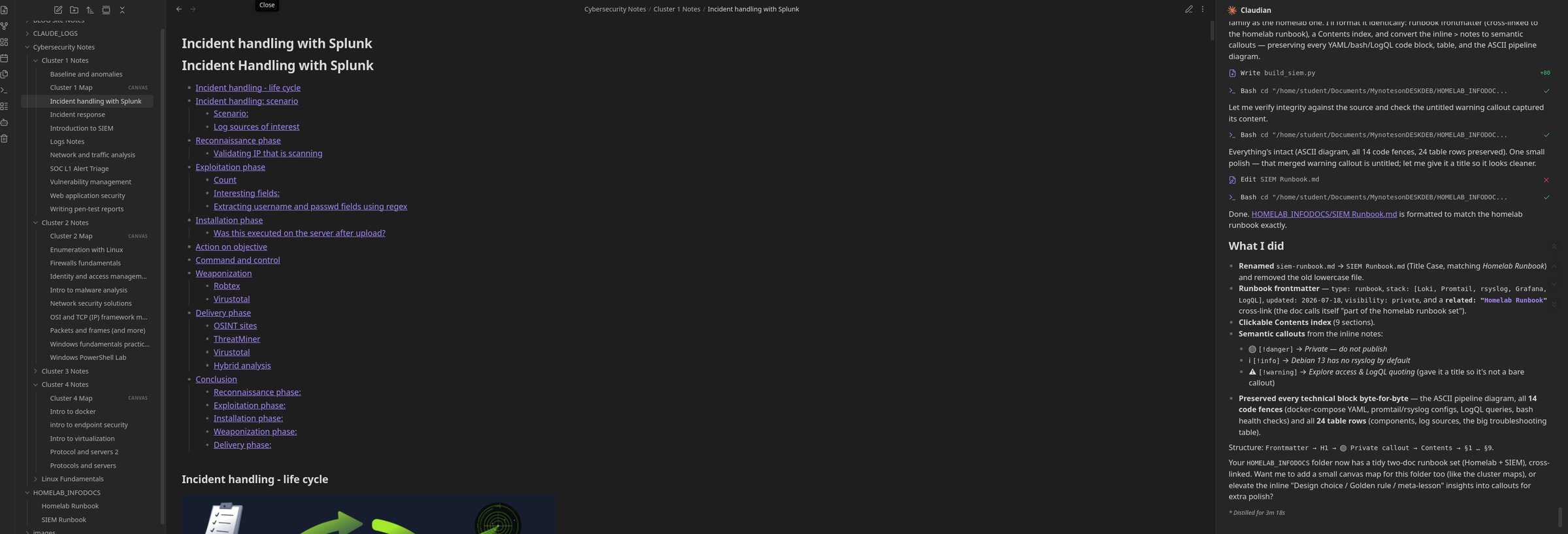
The same pattern runs across the study side of the vault: cluster notes with consistent headings and linked TOCs, canvas maps per cluster, .docx labs long since migrated to Markdown with frontmatter and cross-links. The vault standard exists because maintaining it is nearly free now.
Why bother
Because documentation quality is a consistency problem, and consistency is exactly what humans are worst at sustaining across hundreds of files. I’ll write one excellent note; I will not hand-audit forty of them to make sure the headings, frontmatter, and callouts all match. The agent will, in minutes, and shows its work.
The same rules apply as when Claude edits code, though. Tool calls are visible, edits come as diffs, and the verify step — check the content survived the reformat — is part of the request, not an afterthought. An agent that can run bash in your notes vault deserves the same scrutiny as one that can run bash in your repo.
This post starts a new series — Apps with Claude Integration — for the places Claude ends up embedded in the tools themselves, rather than sitting next to them in a terminal. The vault was the obvious first candidate: it’s where everything else in this blog gets written down first.