A while back I built a front door for the home lab — one Homepage dashboard listing every service, with live status dots. It’s the page I look at most.
On a phone it’s a browser tab. It works, but it’s a shrunk web page: no icon, no native controls, and every visit is a fresh Authentik redirect. I wanted the same thing as an actual app.
This is how that went, including the parts that didn’t work.
Written with Claude Code. Claude wrote the code, the API, and the first draft of this post. I set the goals, made the calls it asked me to make, tested everything on the phone, and edited this. Where it got something wrong — and it did, several times — I’ve left that in, because that’s the honest version.
The constraint that shaped everything
I don’t own a Mac. That single fact decided the architecture.
iOS builds need macOS and Xcode. Without one, native Swift is out, and so is any standalone .ipa — sideloading needs a signed build you can’t produce on Linux. The Apple Developer Program is $99/yr, which I wasn’t paying for a dashboard only I will ever open.
That leaves Expo Go: a free app from the App Store that runs your React Native project inside itself. Real native views, real Keychain, real Face ID. The trade is that the home-screen icon says Expo Go, not LABDECK, and there’s no remote push.
I accepted both. Everything below is built inside that box.
Architecture
iPhone (Expo Go)  ──tailnet──>  100.x.x.x:8090  (labdeck-api, systemd)
      │                                  │
      │  OIDC + PKCE                     ├── /var/run/docker.sock   container state
      └──> auth.mylab.duckdns.org        ├── 127.0.0.1:9090         Prometheus
           (Authentik)                   ├── 127.0.0.1:9093         Alertmanager
                                         └── ~/homepage/config/*.yaml
Three decisions worth explaining.
Tailscale only. My phone is already on the tailnet. Binding the API to the tailnet address means nothing new is published — no Caddy route, no DuckDNS record, no firewall rule, no new public attack surface. It also means internal-only endpoints become reachable to the app without exposing them to anything else.
A new aggregator API instead of talking to services directly. Homepage has no API — its widget data is computed server-side and rendered into HTML. So labdeck-api parses the same services.yaml the dashboard uses and fans out to Docker, Prometheus and the rest. One config, two clients. Edit the web dashboard and the app follows with no rebuild.
The API runs natively under systemd, not in Docker. This one was decided by a single command:
ss -tlnp | grep -E ':(9090|9093|3100)'
Alertmanager and Loki bind loopback only. A container on the caddy_web network can reach the Docker bridge but not 127.0.0.1. A host process reaches everything. That’s the whole reason.
Authentication
The app does authorization-code + PKCE against my existing Authentik — same identity as everything else, revocable centrally, tokens in the iOS Keychain behind Face ID.
One thing here is worth stealing if you’re doing the same. A freshly created OAuth2 provider in Authentik with no signing key set advertises this:
"id_token_signing_alg_values_supported": ["HS256"]
HS256 means symmetric signing — with the client secret. That’s unusable for a public mobile client, because verifying a token would require the API to hold a secret that also ships inside the app. Assigning a dedicated RSA keypair switches it to RS256 and publishes the public half at the JWKS endpoint, so the API needs nothing secret at all.
The API verifies signature, issuer, audience, expiry and subject, with the algorithm pinned:
const { payload } = await jwtVerify(token, keySet(), {
  issuer: config.oidc.issuer,
  audience: config.oidc.clientId,
  algorithms: ["RS256"],   // pin it — don't let the token's own header choose
  clockTolerance: 30,
});
Keeping the lab out of the app bundle
Early on the plan was to publish the JS bundle to Expo’s CDN so the app could open without a dev server running. That plan died later, but it forced a design decision that turned out to be right anyway.
The tailnet address, the Authentik issuer and the OAuth client ID were compiled into app.json. Publishing that uploads my internal addressing to a third party. So they moved into a first-run setup screen and live in the Keychain instead.
The published bundle is now a generic app that asks where its lab is. Verified rather than assumed:
npx expo export --platform ios --output-dir /tmp/labdeck-export --clear
grep -r -a -o -e "100\." -e "duckdns" -e "10\.10\." /tmp/labdeck-export | sort -u
Zero hits, while control strings like labdeck.config still showed up — so the search would have caught a leak if there’d been one. Side benefit: if my tailnet address ever changes, that’s a field edit on the phone, not a rebuild.
The theme
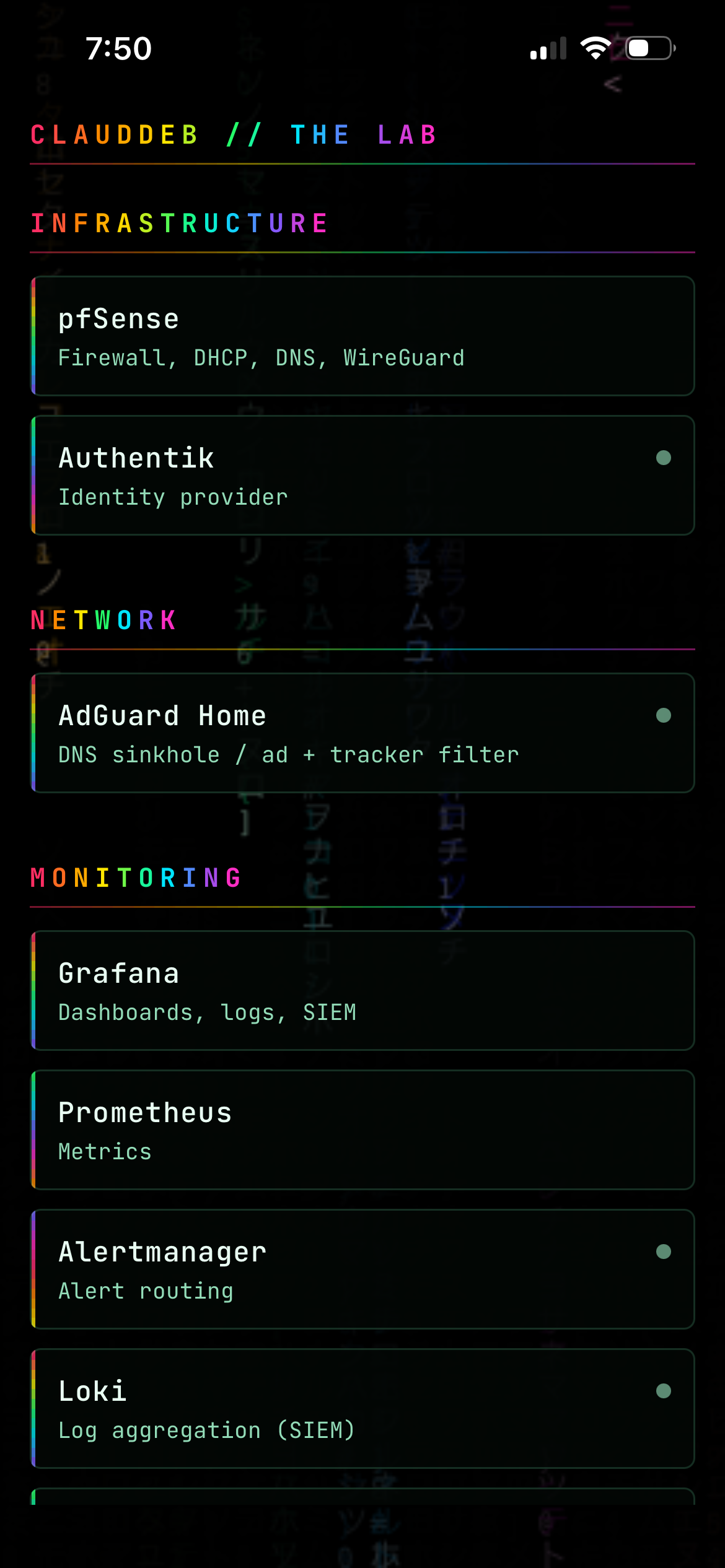
The dashboard runs a theme I call RAINBOW MATRIX — black ground, animated matrix rain on a canvas, dark-glass cards with a rainbow edge, JetBrains Mono. I wanted the app to look identical, not similar.
The palette was copied verbatim out of custom.css into a TypeScript token file. The rain wasn’t ported at all — the original custom.js runs unchanged inside a full-screen WebView behind the UI. It was already tuned for exactly this: 15fps, a 0.65 backing store, no shadowBlur. Reusing it means the two can’t drift, and a script keeps the copy honest:
npm run sync:rain # regenerates from ~/homepage/config/custom.js
React Native has no background-clip: text, so the rainbow group headings colour one character at a time along the gradient. At heading sizes you can’t tell, and it costs no dependency. The INFRASTRUCTURE and MONITORING headings in the screenshot above are doing exactly that.
What broke
This is the useful part.
1. The auth hook silently didn’t run. First test of the protected API returned 200 with no token. Every endpoint was open. The cause was Fastify encapsulation: the hook was registered inside a plugin, so it only applied within that plugin’s scope, and the route plugin registered alongside it never saw the hook. It fails open and looks completely healthy. Attaching the hook to the root instance fixed it.
2. A byte-order mark. The service list came back empty. services.yaml starts with a UTF-8 BOM, which the yaml package rejects with Unexpected scalar at node end at line 1, column 4 — and a defensive catch had turned that into a silently empty list. Strip the BOM on read; don’t edit the file, it belongs to the dashboard.
3. Two caddy reloads that did nothing. Editing the Caddyfile replaced its inode, which detached the bind mount, so the container kept serving the old file. Both reloads exited 0. Exit code zero is not proof a config change landed.
4. Chasing the SDK. create-expo-app scaffolds the newest SDK. My Expo Go is SDK 54, because the App Store only offers the newest build my iOS supports. Claude checked Expo’s version API, which lists client builds that exist rather than what the store ships, and confidently downgraded to 56 first. The phone was the better source of truth. 57 → 56 → 54, two of those wasted.
5. eas update:configure broke the working dev flow. It writes runtimeVersion: {policy: "appVersion"} into app.json. Expo Go loads exposdk:54.0.0 and refuses anything else, so the dev manifest started advertising 0.1.0 and the app wouldn’t open at all — configuring a publishing path that turned out not to work broke the path that did.
6. An empty grant list. Login succeeded, then Authentik returned a bare 400. The log said it plainly:
Invalid grant_type for provider grant_type: authorization_code
The provider had been created through the ORM with grant_types = []. Proxy providers get theirs from a helper that plain OAuth2 providers don’t have. Setting it to authorization_code + refresh_token — and nothing else — fixed it.
The confusing part was the error shown: Unsafe redirect to URL with protocol 'exp'. That’s a knock-on. Authentik tried to redirect the error back to the app’s exp:// URI, Django blocks non-HTTP schemes, so the readable message never arrived.
7. A library that strips trailing slashes. Sign-in worked, then: Token exchange failed: JSON Parse error: Unexpected end of input. In expo-auth-session/build/Fetch.js:
const correctedUrl = url.toString().replace(/\/$/, '');
Every request URL loses its trailing slash. Authentik’s token endpoint is /application/o/token/, and Django won’t route a POST to the unslashed path — it answers 405 with a zero-byte body, which JSON.parse chokes on. Proven with two curls:
# no slash — what the library sent
curl -X POST .../application/o/token   -d '...'   # 405, 0 bytes
# with slash
curl -X POST .../application/o/token/  -d '...'   # 400, JSON error
There’s nothing to configure — the discovery document publishes the correct URL and the library rewrites it on the way out. The fix was to do the token POST with plain fetch and leave the URL alone.
Where it landed
It works. Tailnet only, Authentik-authenticated, Face ID on resume, and it looks like the dashboard because it is the dashboard’s theme.
Honest about what it isn’t — and this is the picture that makes the point:
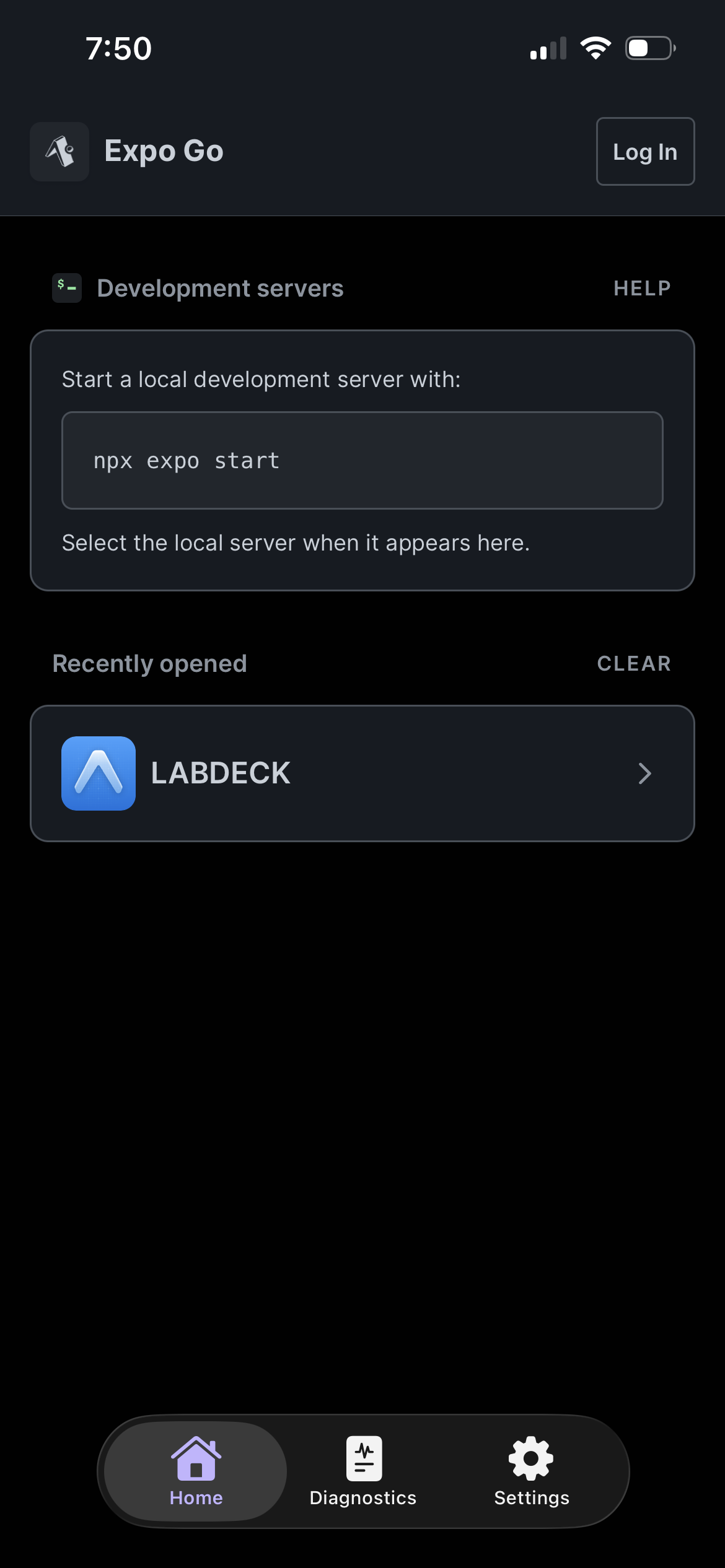
That’s the compromise in one screenshot. LABDECK is a real native app, but it’s a guest inside Expo Go, so the icon on my home screen isn’t mine. There’s no remote push either, and SDK 54 is my ceiling until the phone’s iOS updates. The dev server also has to be running on the lab box — the next job is a systemd unit for it, which turns out to be the simple answer I skipped past while chasing a CDN.
Status dots currently all read grey. /v1/status, /v1/metrics, /v1/security and /v1/alerts are next, and then the dots mean something.
What I take from this: the failures were all in the seams. Not one was in the app’s own logic — they were a framework’s scoping rule, a byte-order mark, a bind mount, a version endpoint that answered a different question than the one asked, an empty array, and a regex in someone else’s HTTP helper. Reading the server’s logs settled every one of them faster than reasoning about the client ever did.