The problem I set out to solve
My homelab takes a backup every night at 20:30. A cron job runs a script, the script dumps my Authentik database, snapshots the Vaultwarden vault, tars up the configs, encrypts a copy with age and drops it into OneDrive. It writes everything it does to /var/log/lab-backup.log.
And nobody reads /var/log/lab-backup.log.
That was the thing bothering me. If the backup silently stopped, I wouldn’t find out when it stopped — I’d find out the day I needed a restore, which is the worst possible day to learn anything. So the plan was simple: get n8n to check the backup actually happened, and buzz my phone if it didn’t.
This was my first time ever touching n8n. I’d deployed it a few days earlier, behind Caddy with a wildcard cert, no published ports, joined to my existing caddy_web network like everything else in the lab. But I’d never built a workflow. This was going to be a nice, contained first project.
It was not contained. It was genuinely challenging, occasionally infuriating, and easily the most fun I’ve had in the lab in weeks.
The design
Four nodes:
- Schedule Trigger — daily at 21:00, half an hour after the backup runs
- Execute Command — count backup directories from the last 24 hours, and measure the newest one
- IF — alert if the count is zero, or the newest backup is suspiciously small
- HTTP Request — POST to ntfy, which pushes to my phone
To let n8n see the backups, I added a read-only bind mount to the compose file:
volumes:
  - n8n_data:/home/node/.n8n
  - /home/student/backups:/backups:ro
:ro matters. n8n needs to look at my backups, never touch them.
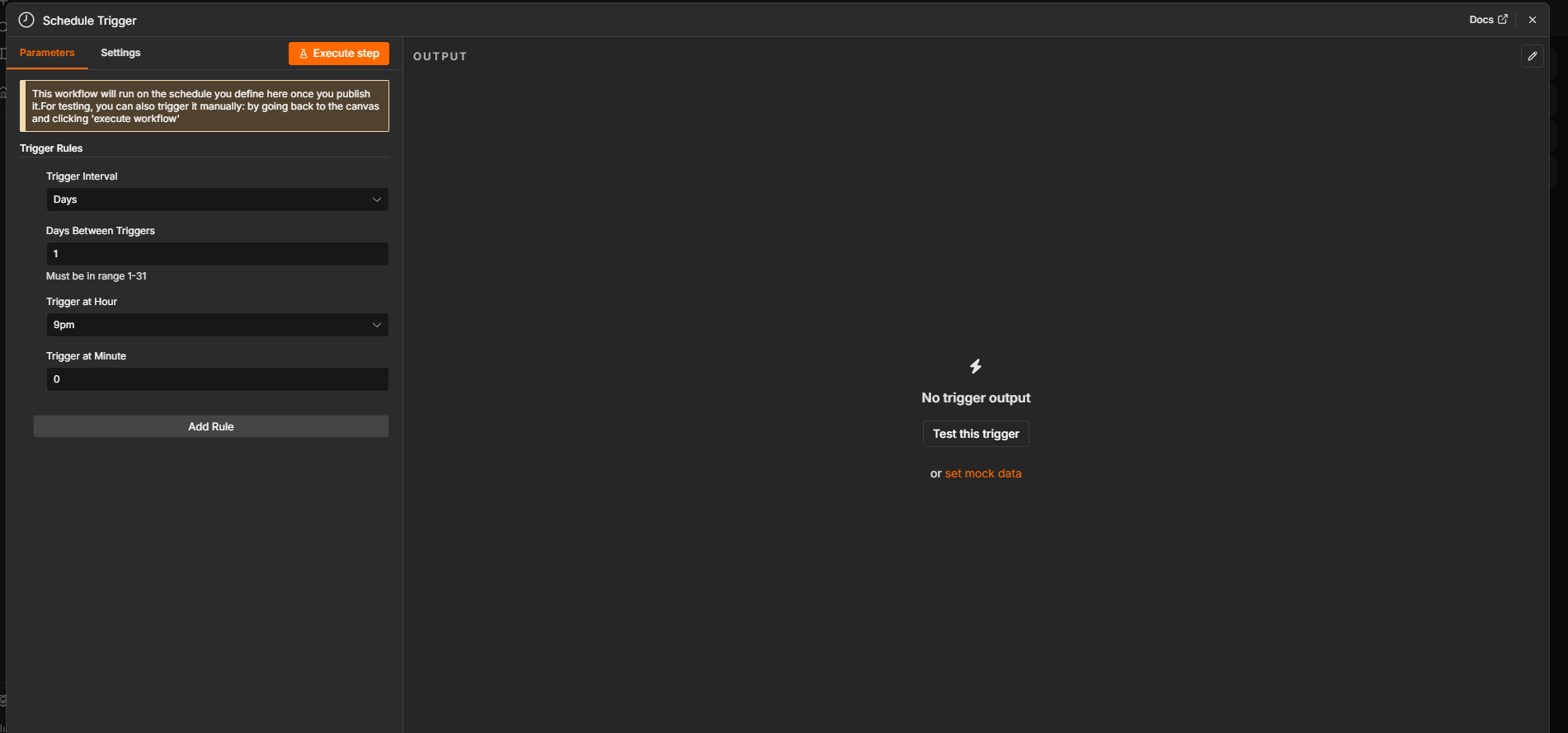 The Schedule Trigger. Timezone comes from
 GENERIC_TIMEZONE=Australia/Sydney in the compose file, so 9pm means 9pm here, not UTC.
Then the mount showed me something
Before building anything, I checked the container could actually see the directory:
sudo docker exec n8n ls -la /backups
It could. But look at the dates.
drwxr-xr-x  2 root root  2026-07-16-2141
drwxr-xr-x  2 root root  2026-07-16-2149
drwxr-xr-x  2 root root  2026-07-17-2030
drwxr-xr-x  2 root root  2026-07-18-2030
It was 23 July. The newest backup was from the 18th. Nothing for the 19th, 20th, 21st or 22nd.
My backups had been dead for five days and I found out by accident, while building the tool designed to tell me about exactly this. I’m not sure I could have written a better argument for the project if I tried.
Tracking it down
I worked through it layer by layer, and every layer came back clean:
- Was the box even on?
last -xshowed a login session running continuously from 20 July 14:07 through to 22 July 21:59. The machine was up at 20:30 on all three nights. - Was cron running?
systemctl status cron— active, andenabled, so it starts at every boot. - Was the job still installed?
sudo crontab -lshowed the entry, exactly as written:30 20 * * * /home/student/backup-lab.sh >> /var/log/lab-backup.log 2>&1
So the machine was on, cron was running, the job was scheduled. Which left one place to look — the log nobody reads:
Backup complete: /home/student/backups/2026-07-17-2030
Backup complete: /home/student/backups/2026-07-18-2030
/bin/sh: 1: /home/student/backup-lab.sh: not found
/bin/sh: 1: /home/student/backup-lab.sh: not found
/bin/sh: 1: /home/student/backup-lab.sh: not found
/bin/sh: 1: /home/student/backup-lab.sh: not found
Four failures. One per missed night.
The cause turned out to be embarrassingly mundane: a while back I tidied my scripts into ~/Desktop/my_scripts/. The script moved. Root’s crontab still pointed at the old path. A crontab entry is just a string — cron has no idea whether the path resolves to anything until the moment it tries, and when it doesn’t, it writes one line to a log and shrugs.
Worth noting the error message is misleading, too. not found from /bin/sh has two meanings: the file genuinely isn’t there, or the file exists but its shebang interpreter doesn’t — which is what you get from CRLF line endings, where line 1 becomes #!/bin/bash\r and there’s no such binary. I checked for that before concluding the file was really gone.
The fix, and I took the opportunity to do it properly rather than just repointing cron at my Desktop:
sudo mv ~/Desktop/my_scripts/backup-lab.sh /usr/local/sbin/backup-lab.sh
sudo chown root:root /usr/local/sbin/backup-lab.sh
sudo chmod 700 /usr/local/sbin/backup-lab.sh
A script that cron runs as root should not live in a directory writable by my unprivileged user. Anything that compromises my normal account could rewrite that file and get root at 20:30 without ever touching sudo. That’s a textbook privilege-escalation path, and /usr/local/sbin is where locally-written admin scripts belong.
Repointed the crontab, ran it manually, exit code 0, fresh backup on disk and the matching .age file in OneDrive. Incident closed — five days late.
Back to n8n: the node that didn’t exist
Then I went to add the Execute Command node and it simply wasn’t there. Searching “execute” returned Execute Sub-workflow and AI Agent and nothing else.
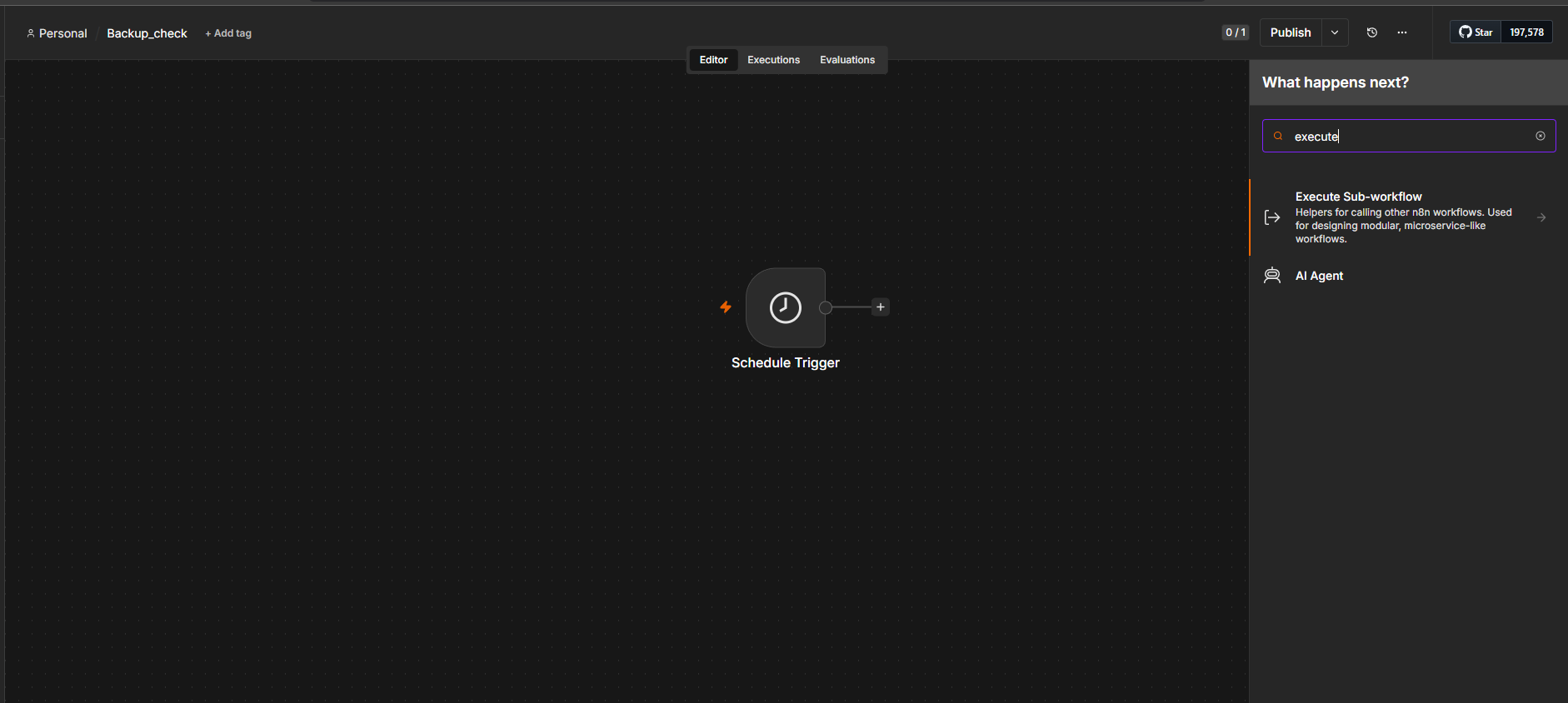 Searching “execute” — no Execute Command anywhere.
This turned out to be an n8n 2.0 breaking change. The Execute Command and Local File Trigger nodes are disabled by default in 2.x because they let anyone with access to your n8n instance run arbitrary commands. I’d pulled :latest, so I got 2.x.
The fix is the NODES_EXCLUDE environment variable — note, no N8N_ prefix, unlike almost everything else in the config. It takes a JSON array as a string:
- 'NODES_EXCLUDE=["n8n-nodes-base.localFileTrigger"]'
That replaces the default exclusion list with one that blocks only Local File Trigger, so Execute Command becomes available again. I deliberately didn’t use NODES_EXCLUDE="[]", which enables everything — re-enabling one risky node on purpose feels like a better habit than switching the whole safety mechanism off.
A lot of forum threads about this reach for N8N_NODES_INCLUDE and fail. That’s the wrong lever: NODES_INCLUDE is an allowlist that replaces your entire node set, so setting it to just Execute Command would leave you with one node and nothing else.
The security tradeoff is real and worth being deliberate about. Enabling this node means anyone who logs into n8n can run shell commands inside that container. My mitigations: single user, no published ports, behind Caddy with a real certificate, owner account required. Reasonable for a home lab. Not something I’d do on a shared instance.
The command
Rather than two separate checks that could disagree with each other, I had one shell command emit a single JSON snapshot:
count=$(find /backups -maxdepth 1 -mindepth 1 -type d -mtime -1 | wc -l | tr -dc '0-9'); \
latest=$(ls -1dt /backups/*/ 2>/dev/null | head -1); \
size=$(du -sk "$latest" 2>/dev/null | cut -f1 | tr -dc '0-9'); \
printf '{"count":%s,"latest":"%s","size_kb":%s}' "${count:-0}" "${latest:-none}" "${size:-0}"
Breaking that down:
-maxdepth 1stops it recursing into the backup folders;-mindepth 1excludes/backupsitself, which would otherwise always match and make the count useless-mtime -1means modified less than 24 hours ago — the minus sign is doing real work, since-mtime 1means exactly one day olddu -skgives a summarised size in kilobytes,cut -f1strips the path off the endtr -dc '0-9'deletes every character that isn’t a digit (-ddelete,-ccomplement), guaranteeing a clean integer${count:-0}means “use this variable, or 0 if it’s empty” — so a failure produces a defined value instead of malformed JSON
That last one is a double-edged sword and it bit me later.
Why the size check exists
Originally I only planned to count directories. Then, through a mistake, I ended up with two stray backup folders that looked perfectly legitimate — correct name, correct timestamp, a .sql.gz file inside — where the file was 20 bytes.
Twenty bytes is the size of a gzip stream containing nothing: a 10-byte header and a 10-byte footer with no data in between. gzip had faithfully compressed the empty output of a pg_dump that never ran.
A real authentik-db.sql.gz in my lab is about 2.77 MB. A fake one is 20 bytes. That’s not a subtle difference, and it made the argument for me: a directory existing is not the same as a backup existing. A counting check would call those a success.
So I measured a real backup (du -sk said 3512 KB) and set the floor at 2000 KB — comfortably below normal, wildly above a failure.
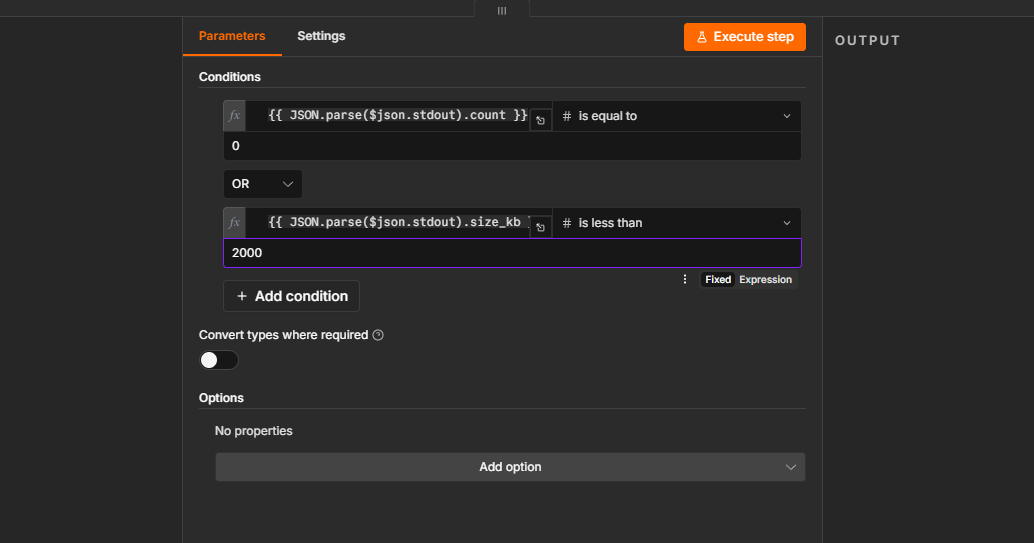 Two conditions joined with OR: alert if there’s no backup at all, or if the newest one is under 2000 KB. With AND, an existing-but-empty backup would slip through silently.
Three ways this thing lied to me
This is the part I actually learned the most from, and it’s why I’m writing it up in detail.
1. A type error with a single space
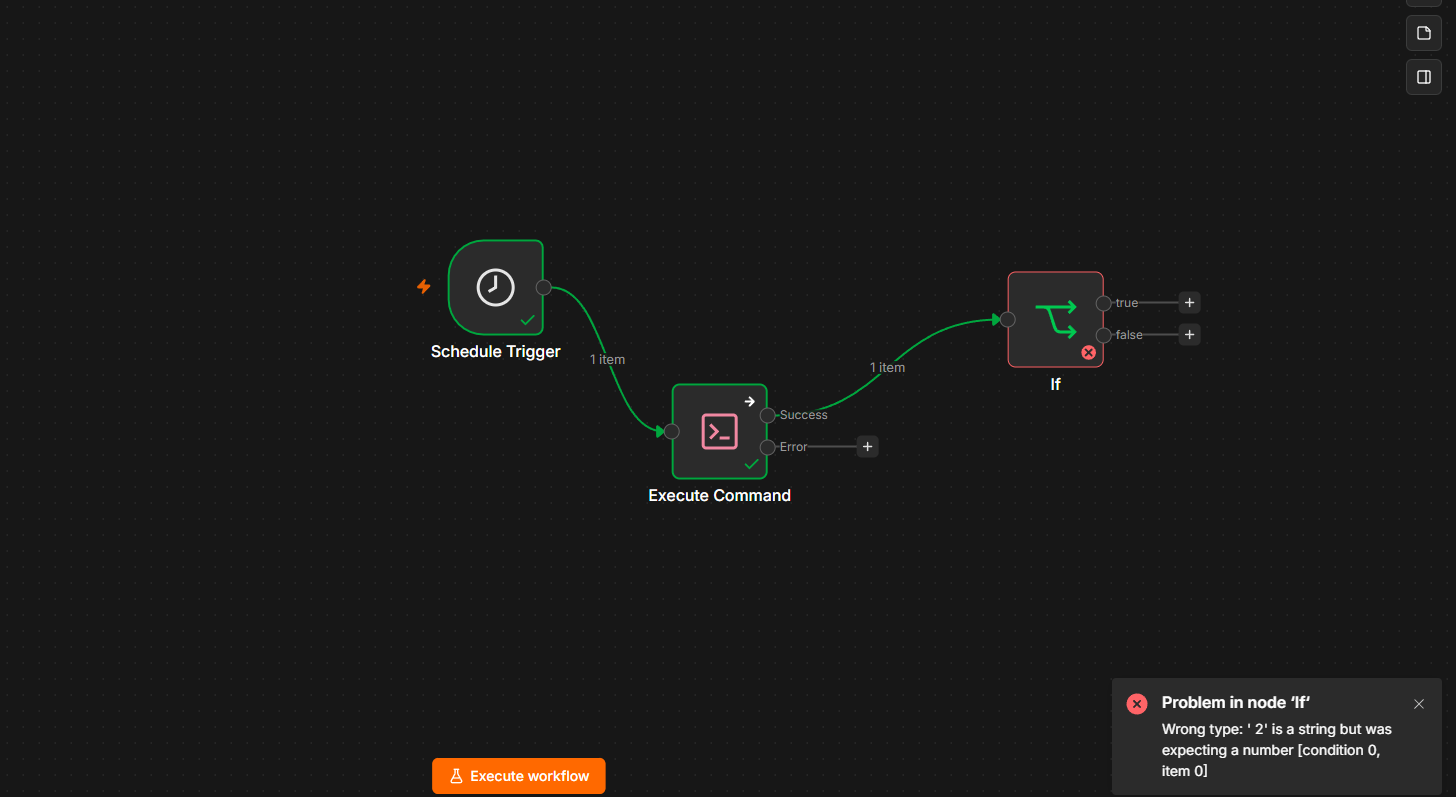
n8n’s IF node does strict type validation, and it kept rejecting my number comparison: Wrong type: ' 2' is a string but was expecting a number.
Note the space before the 2. The cause is a typing rule in n8n that catches people constantly: if an expression field contains only {{ ... }}, it returns the native type — a real number. If there’s any other character in the field, even one leading space, n8n treats the whole thing as a string template and hands you " 2" instead of 2.
n8n helpfully offers to fix this by enabling “Convert types where required”. I deliberately didn’t. Coercing whatever you’re given is how you end up confidently trusting a wrong answer — the strict error is the feature, not the obstacle. I deleted the field contents and retyped them with no stray whitespace.
2. A permission problem disguised as a number
Then the check ran cleanly and reported size_kb: 0.
A directory that exists cannot be zero kilobytes. What had actually happened: my nightly cron run created its directory as 750 root:root. The n8n container runs as UID/GID 1000, which isn’t root and isn’t in the root group, so it couldn’t traverse into the folder. du failed, its error went to /dev/null thanks to my own 2>/dev/null, and ${size:-0} cheerfully supplied a plausible-looking zero.
The workflow then did exactly what I’d told it to: 0 < 2000, so it fired the alert. Logic flawless, conclusion wrong. My backup was completely fine; the checker just couldn’t see it.
That’s a false positive, and a nightly false positive is worse than no alarm at all. Within a week I’d be swiping the notification away without reading it, and the one night it meant something I’d swipe that away too. Alert fatigue is how monitoring systems die.
The fix uses a nice property of Docker’s UID mapping: my host student group is GID 1000, and the container’s node group is also GID 1000. So:
sudo chown -R root:student /home/student/backups/*/
Root writes, the student group reads, nobody else gets anything — mode 750, which is tighter than the old world-readable 755 and works for n8n at the same time.
To make it stick for future runs, I inserted it into the backup script itself with a surgical sed rather than a risky copy-paste:
sudo sed -i '/^AGE_PUB=/i chown -R root:student "$DEST"' /usr/local/sbin/backup-lab.sh
sudo bash -n /usr/local/sbin/backup-lab.sh && echo "syntax OK"
sed -i edits in place, /^AGE_PUB=/ finds the anchor line, and i inserts before it — placing the chown after all the artefacts are written but before the encryption step. bash -n then parses the script without running it, which you should absolutely do before letting cron execute something as root.
3. A GET where a POST should be
Right before publishing, I noticed the second alert node’s subtitle read GET: https://ntfy.sh/... while the first read POST. HTTP Request nodes default to GET, and I’d gone straight to configuring headers without changing it.
A GET against an ntfy topic doesn’t publish anything — it opens a subscription stream. So the alert that fires when the checker itself breaks would have silently done nothing. The one node whose entire job is “tell me when the monitoring is broken”, quietly broken.
The finished workflow
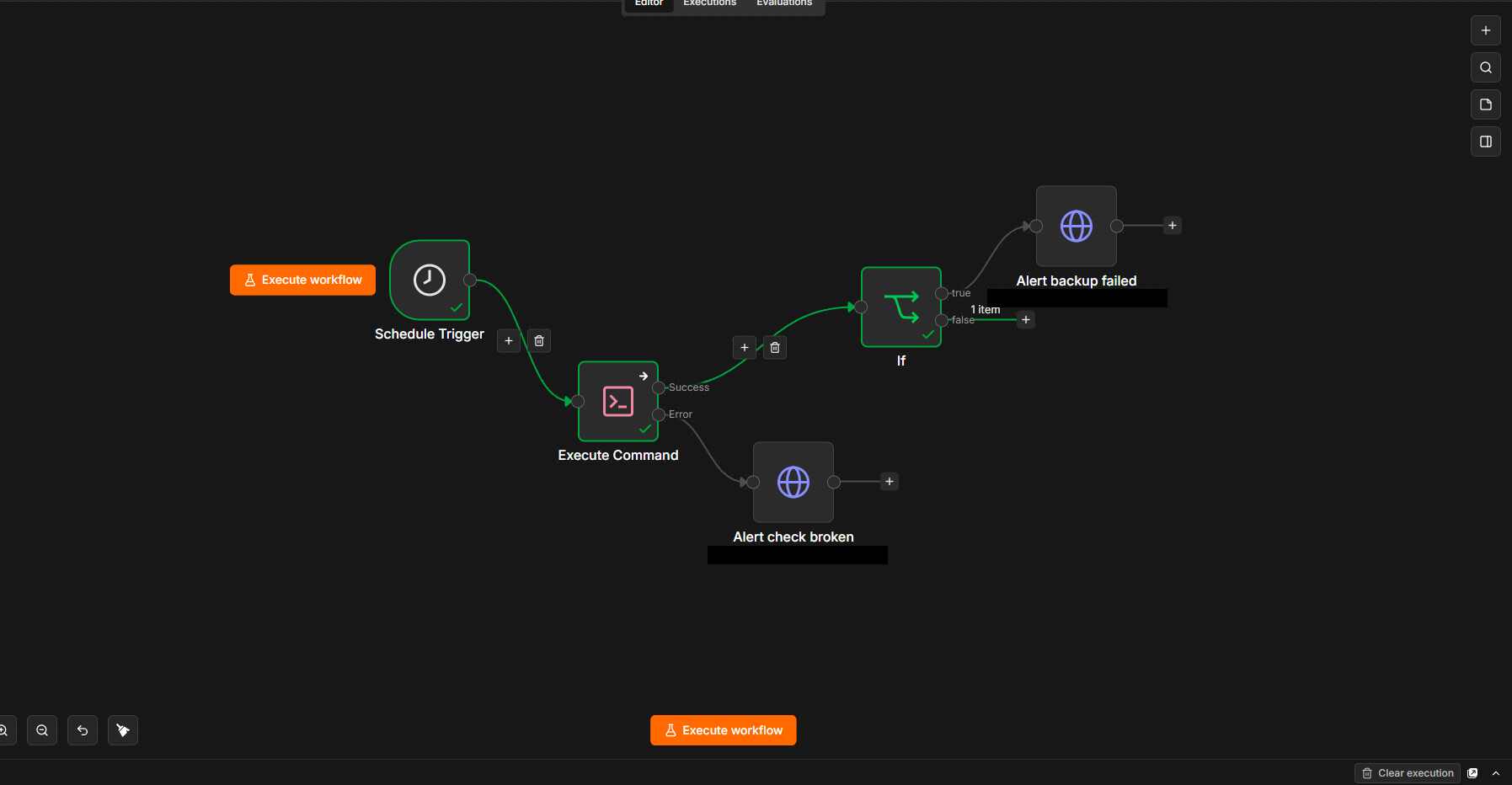 Schedule Trigger → Execute Command → IF → ntfy, with a second alert wired to the Execute Command node’s error output.
The error output is the piece I’d encourage anyone to add. By default, if a node throws, the whole workflow aborts — meaning if my /backups mount ever disappeared, the workflow would die and send nothing. A monitoring system that goes quiet at exactly the moment something is wrong. Setting On Error → Continue (using error output) gives you a third connector to route into a separate alert with a different message, so at 9pm I instantly know whether the backup failed or the watchdog did.
Then I tested it — properly, in both directions. An untested alert path is not an alert path.
To force the true branch, I temporarily changed the size threshold from 2000 to 99999, so 3536 < 99999 evaluated true and the workflow routed down the alert path with real data attached:
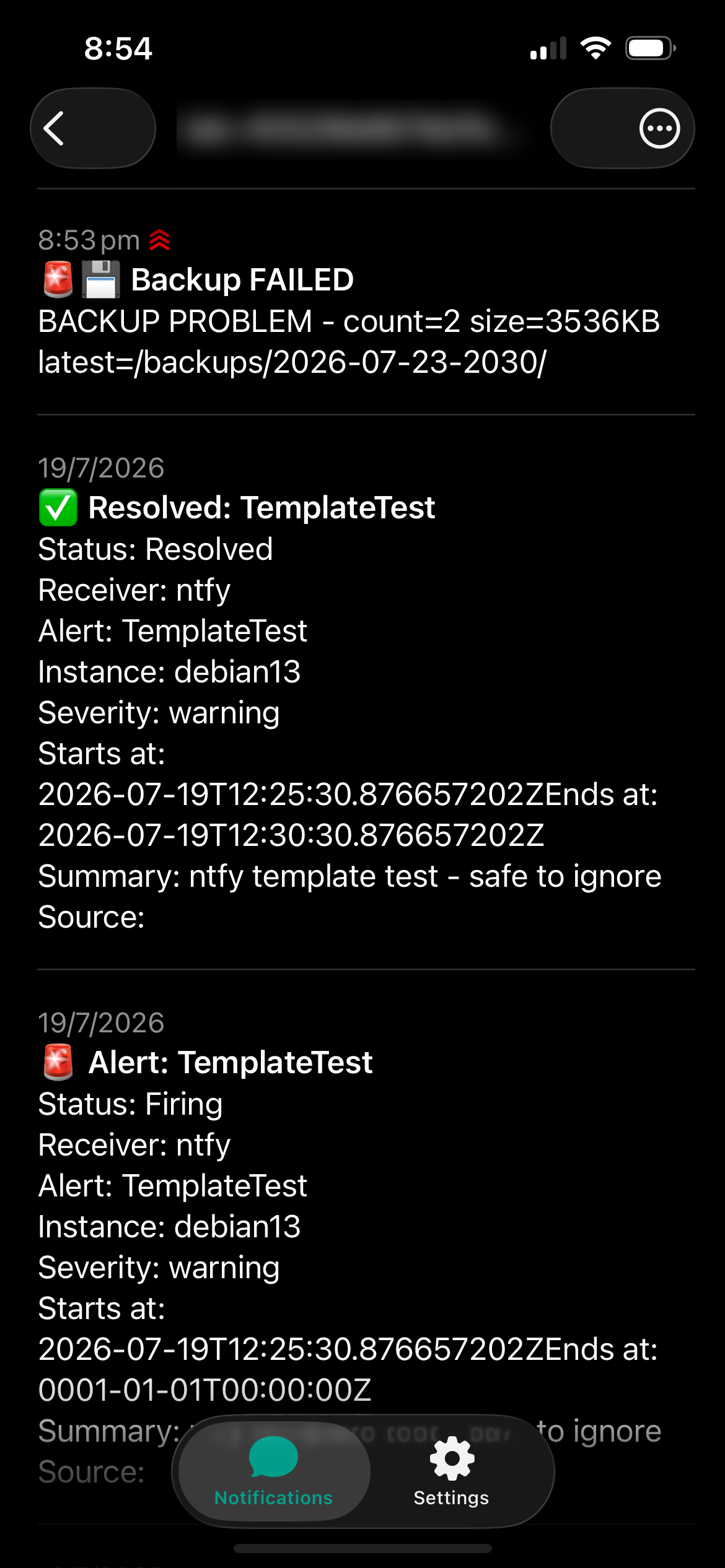 Real values in the message body, so the notification tells me which failure happened rather than just that something did.
Then — and this is the half people skip — I set it back to 2000 and ran it again to confirm it stays silent when everything’s fine.
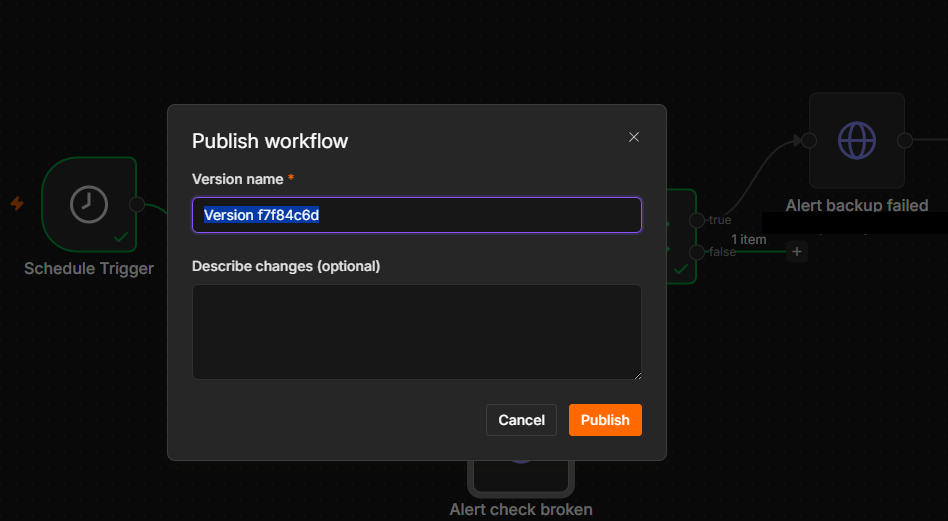 n8n 2.0 versions published workflows, so this doubles as a commit message. I noted where the 2000 KB threshold came from, because in three months I won’t remember whether it was measured or guessed.
What I took away from this
The thing that keeps rattling around my head is how my backup failed. Cron ran on time. The script exited non-zero, correctly. The error was captured to a log file, correctly, with 2>&1 and everything. Every single layer worked exactly as designed — and the outcome was still five days of no backups, discovered by accident.
Nothing was watching the exit code. That’s the entire gap, and it’s not a gap you can close by writing better scripts. It needs something outside the system asking, independently, “did the thing actually happen?”
And the three bugs I hit building the watchdog were all the same shape as the original failure: a value that looked right and wasn’t. A string that looked like a number. A zero that was really a permission error. A GET that looked like a configured HTTP node. In every case the system produced a confident, plausible, wrong answer instead of an error — which is exactly what a 20-byte backup file does, and exactly what a crontab pointing at a deleted script does.
Systems that fail loudly are fixable. Systems that fail plausibly cost you five days.
Still to do
- A dead man’s switch. I shut my VMs down at night. If the box is off at 21:00, n8n skips the run entirely rather than catching up — so a night where everything was down looks identical to a night where everything was fine. Closing that needs something outside my lab expecting a check-in.
- Back up n8n itself. The
n8n_datavolume holds my workflows and credential store. It’s currently not in my backup set, which is a bit of a joke given the subject matter. - Back up the machinery. The script and root’s crontab now go into the backup directory, so a rebuild restores the thing that makes backups, not just the backups. My backup system had no backup of itself, which was only obvious in hindsight.
- Verify the OneDrive copy properly. Right now I could check the local
.agefile exists, but that only proves it was written to disk — if the sync client is wedged, it never reaches the cloud. Real verification means querying Microsoft’s API for what’s actually up there.
First impressions of n8n
Honestly? I loved it. Coming from writing bash and YAML all day, having a canvas where you can see data flowing between nodes and inspect exactly what each one received is a genuinely different way to debug. The INPUT/OUTPUT panels told me the IF node wasn’t connected far faster than reading a log would have.
It’s also opinionated in ways that took getting used to — the strict type validation felt hostile until I realised it was catching a real bug, and the expression-vs-fixed-field distinction is subtle enough to burn an hour if you don’t know about it.
Four nodes. It took me most of an evening, I broke my terminal twice, and I found a five-day production outage on the way. Best first project I could have picked.