Two halves
apt patches Debian. My homelab is not Debian — it’s about a dozen containers sitting on top of Debian. AdGuard, Authentik, Vaultwarden, Caddy, n8n, Greenbone, Homepage. apt will never once mention that Vaultwarden cut a release.
So “keep the lab patched” is really two jobs:
- Debian packages —
unattended-upgrades, already a solved problem, just needs scheduling and a report. - Everything I actually run — nobody’s solved that for me. Containers only update when I decide to pull.
This post is both halves. The first one taught me something uncomfortable about monitoring, so I’ll start there.
Half one: the Debian side
I already had a nightly chain:
20:30  backup script       root cron
21:00  backup watchdog     n8n
The backup watchdog was my first n8n workflow, and it set the pattern I’ve stuck with since: n8n is a read-only observer that turns a silent state into a push notification. No host privilege, no SSH key, no new secret. Its only window onto the host is a read-only bind mount.
Patching slots into that chain. Two decisions up front.
Patch after the backup, not with it. My first instinct was “run them around the same time”. That’s wrong twice over: a patch that breaks something should have a fresh restore point sitting behind it, and you don’t want apt rewriting packages while a script is tarring up configs. So 21:30, after the 20:30 backup and the 21:00 watchdog.
Don’t let n8n do the patching. n8n’s Execute Command node runs inside its own container. Making n8n patch the host means giving a web-facing app an SSH key with root on the box. Instead, systemd patches and n8n reads a status file and reports. Same observer pattern, no new privilege.
unattended-upgrades was already installed and enabled, so this was a retiming job, not an install:
$ systemctl cat apt-daily-upgrade.timer | grep -E 'OnCalendar|Randomized'
OnCalendar=*-*-* 6:00
RandomizedDelaySec=60m
A drop-in moved it to 21:30. Note the empty OnCalendar= — without it, systemd keeps both times and the unit fires twice a day:
[Timer]
OnCalendar=
OnCalendar=*-*-* 21:30
RandomizedDelaySec=0
The jitter had to go too. 60 minutes of randomisation would smear the run across 21:30–22:30 and race the report that reads its output.
Then a hook to write a status file where n8n can see it:
[Service]
ExecStopPost=-/usr/local/sbin/lab-patch-status.sh
ExecStopPost, not ExecStartPost — only ExecStopPost gets SERVICE_RESULT and EXIT_STATUS in its environment, which is how the script learns whether the run succeeded. The leading - means a broken hook can’t mark the unit failed; instead the status file goes stale and the n8n side alerts on the staleness. Fail loud downstream rather than swallow it.
That all worked. The timer moved, the hook fired, the report arrived.
The part where my monitor lied to me
First real run, 21:30. The report came back green:
{
  "service_result": "success",
  "exit_status": 0,
  "upgraded_count": 0,
  "pending_count": 7,
  "pending_security_count": 4
}
Success. Zero packages upgraded. Four security updates still pending.
Those aren’t contradictory readings of a healthy system — they’re a system telling me it did nothing and calling it a win. And the four weren’t third-party noise:
libexpat1        2.7.1-2  ->  2.8.2-1~deb13u1   Debian-Security:13/stable-security
libexpat1-dev    2.7.1-2  ->  2.8.2-1~deb13u1   Debian-Security:13/stable-security
libnss3          3.110-1+deb13u3 -> +deb13u4     Debian-Security:13/stable-security
linux-libc-dev   6.12.96-1 -> 6.12.100-1         Debian-Security:13/stable-security
All four are Debian-Security, which is exactly what my Origins-Pattern allows. They should have installed. (The other three pending were brave-browser, code and tailscale — third-party origins, correctly excluded.)
The unit definitely ran:
$ systemctl show apt-daily-upgrade.service -p ExecMainStartTimestamp -p Result
ExecMainStartTimestamp=Sat 2026-08-01 21:30:00 AEST
Result=success
But:
$ ls -l /var/lib/apt/periodic/unattended-upgrades-stamp
-rw-r--r-- 1 root root 0 Aug  1 11:59 /var/lib/apt/periodic/unattended-upgrades-stamp
11:59. The 21:30 run never touched it.
apt-daily-upgrade.service doesn’t run unattended-upgrade. It runs /usr/lib/apt/apt.systemd.daily, a wrapper with its own scheduling logic, driven by:
APT::Periodic::Unattended-Upgrade "1";
That 1 is an interval in days. The wrapper checks its stamp file, sees it already ran at 11:59 that day, skips the upgrade step, and exits 0. Retiming the systemd timer doesn’t retime the wrapper’s internal gate. I moved when the wrapper is asked, not when it’s willing to work.
So success meant “the wrapper exited cleanly”. It never meant “patches were applied”, and I’d built a whole notification pipeline on top of that assumption.
This is the same shape as the five-day silent backup outage that made me build the watchdog in the first place — one level up. Then, nothing watched the exit code. Now, something watched the exit code and the exit code was useless. A monitor that reports healthy when nothing happened is worse than no monitor, because it also tells you not to look.
The fix, and the better lesson
Stop going through the wrapper. /usr/bin/unattended-upgrade has no interval gate — call it directly from a dedicated unit:
[Service]
Type=oneshot
ExecStartPre=-/usr/bin/apt-get update -q
ExecStart=/usr/bin/unattended-upgrade
ExecStopPost=-/usr/local/sbin/lab-patch-status.sh
TimeoutStartSec=30min
The ExecStartPre matters: apt.systemd.daily normally handles the update step, so bypassing it means owning that too, or unattended-upgrade works from stale package lists.
But swapping the unit only fixes this bug. The deeper problem is that my report trusted a process’s exit code as a proxy for work being done. So the status script now records something that can’t lie about it:
# unattended-upgrade rewrites its log every time it genuinely runs, so the log's
# age is a direct signal that work happened, independent of any exit code.
if [ -f "$UU_LOG" ]; then
    uu_log_age_sec=$(( $(date +%s) - $(stat -c %Y "$UU_LOG") ))
else
    uu_log_age_sec=-1
fi
And the report asserts progress rather than absence of failure:
const failed    = p.service_result !== 'success' && p.service_result !== 'manual';
const didNotRun = p.uu_log_age_sec === -1 || (p.uu_log_age_sec || 0) > 3600;
const noWork    = !failed && (p.pending_security_count || 0) > 0;

const alert = stale || failed || didNotRun || noWork || p.reboot_required === true;
noWork is the one that would have caught the original bug: the run finished fine, and security updates are still outstanding. Fed the exact payload from that night, it now fires Security updates STILL pending instead of a green tick.
There are legitimate reasons a security update lingers — a held package, a pending reboot. I’d still rather be told.
The same symptom, a completely different cause
Forcing a run to check the fix:
$ ls -l /var/lib/apt/periodic/unattended-upgrades-stamp
-rw-r--r-- 1 root root 0 Aug  1 22:56 /var/lib/apt/periodic/unattended-upgrades-stamp
22:56, not 11:59. The gate was gone, pending_security_count went to zero, and uu_log_age_sec came back 0 — the binary really had run this time.
And the report still said upgraded_count: 0.
Different bug, identical symptom. My status script scraped the log for Packages that were upgraded:. unattended-upgrade is a readable Python script, so rather than guess I went and looked:
$ grep -n "Packages that" /usr/bin/unattended-upgrade
1707:            body += _("Packages that were upgraded:\n")
2605:    logging.info(_("Packages that will be upgraded: %s"), " ".join(pkgs))
Line 1707 builds the email body. I don’t have mail configured, so that string never reaches the log. The line that actually gets logged is 2605 — “will be upgraded”, not “were upgraded”. My grep could never have matched, on any run, ever.
So for a while success / 0 upgraded meant “nothing was patched”, and then it meant “six packages were patched”, and the report was incapable of telling me which. Two unrelated faults producing one indistinguishable output.
The parser now reads the right string, restricts itself to the most recent run block so an old package list can’t bleed through, and records a separate upgrades_installed flag taken from the All upgrades installed confirmation — because “will be upgraded” is intent, logged before dpkg does anything. A count and a completion flag are different facts and deserve different fields.
With it fixed:
{
  "upgraded_count": 6,
  "upgraded": "libexpat1 libexpat1-dev libgd3 libnss3 linux-image-amd64 linux-libc-dev",
  "pending_count": 3,
  "pending_security_count": 0,
  "reboot_required": true,
  "upgrades_installed": true
}
Six, not the four I’d been staring at earlier — the new unit runs apt-get update itself, which surfaced two more. linux-image-amd64 is why the reboot flag flipped. The three left pending are brave-browser, code and tailscale: third-party origins, correctly excluded from unattended upgrades.
Half two: watching for releases
Now the half apt can’t see.
GitHub publishes an Atom feed of releases per repo at https://github.com/OWNER/REPO/releases.atom. No API key, no auth, and at one poll per repo per day the rate limit is irrelevant. Seven repos, one workflow, one notification when a version changes — loud if the release notes look security-related, quiet if it’s a routine bump, silent when nothing changed.
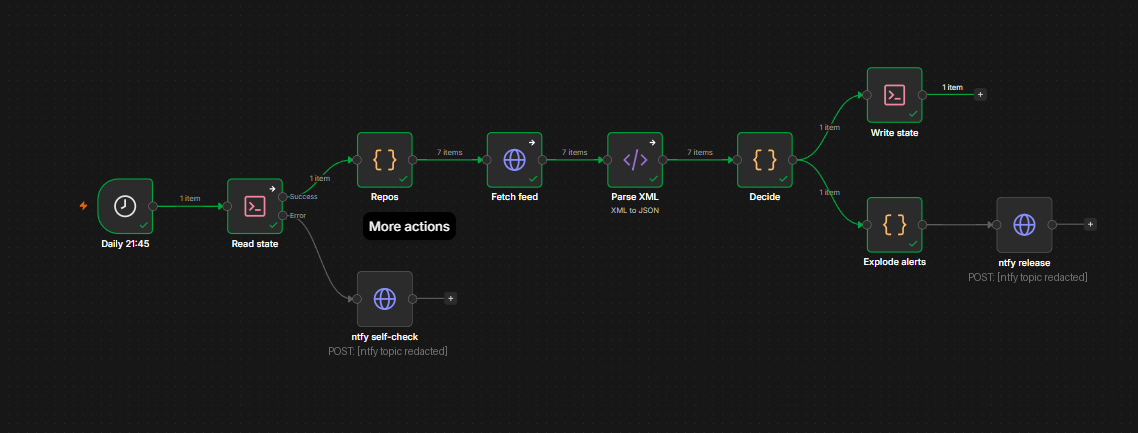
State, and why a file beats a time window
n8n is stateless per execution. To know Caddy 2.11.4 is new, the workflow has to remember what it saw last time. I store a tag per repo:
{"caddyserver/caddy":"v2.11.4","goauthentik/authentik":"version/2026.5.6"}
Storing a tag rather than “anything published in the last 24 hours” matters more than it looks, because I suspend my VMs at night and n8n has no catch-up — a schedule that fires while the box is off is skipped, not deferred.
With a time window, three days powered down means three days of releases silently lost. With a stored tag, the next successful run still sees anything newer than what’s recorded. Detection is delayed; nothing is missed. It’s also idempotent — run it five times, get one alert.
That also drove the schedule. The only window I know the box is up is 20:30–22:00, because four other jobs run in it and I get their notifications. So Release Watch runs at 21:45, inside the known-good window, rather than at a quieter midday hour I’d only be assuming.
The least-privilege bit worth copying
n8n already had one bind mount — my backups, read-only:
- /home/student/backups:/backups:ro
The lazy move is to drop the state file in there and flip that to rw. That hands a web-facing application write access to my entire backup set in order to store 246 bytes of bookkeeping.
Instead the state file gets its own mount, containing nothing else:
volumes:
  - n8n_data:/home/node/.n8n
  - /home/student/backups:/backups:ro      # unchanged, still read-only
  - /home/student/n8n-state:/state:rw      # new, writable, isolated
If n8n were ever compromised, the blast radius of its write access is one throwaway file it rewrites daily anyway. Verify both properties afterwards rather than assuming them:
$ docker exec n8n sh -c 'echo t > /state/.wtest && rm /state/.wtest && echo WRITABLE'
WRITABLE
$ docker exec n8n sh -c 'touch /backups/.wtest 2>&1 || echo "backups read-only - correct"'
touch: /backups/.wtest: Read-only file system
backups read-only - correct
Two things that bit me here. Bind mounts are fixed when a container is created, so docker compose restart silently does nothing — it has to be up -d, which replaces the container. And no chown was needed: the container runs as node, UID 1000, and my host user is UID 1000, so the process arrives as the file’s owner. The kernel compares numbers, not names.
Four things the real feeds taught me
I wrote the comparison logic, then tested it against the actual feeds before importing anything. Every one of these would have shipped as a silent bug.
1. Rolling pointer tags. n8n-io/n8n publishes releases literally tagged stable and beta — moving pointers that sit at the top of the feed and never change value:
tag=stable        updated=2026-07-31
[email protected]    updated=2026-07-31
tag=beta          updated=2026-07-31
Take “the newest entry” and you detect an n8n update exactly never.
2. Pre-releases sit above the newest stable. AdGuard ships betas as -b.NN, not -beta, so my first filter waved them straight through. authentik’s newest release is an -rc1:
v0.108.0-b.90     <- beta, newest
v0.108.0-b.89
v0.107.78         <- newest stable, and the version I actually run
“Take entry[0], skip it if it’s a pre-release” doesn’t work either — that skips the repo entirely and never records anything. You have to scan for the first stable entry.
3. Tags can contain slashes, and the link URL-encodes them. authentik’s tags look like version/2026.5.6. In the entry’s link.href that’s version%2F2026.5.6. The Atom <id> carries it intact:
id   : tag:github.com,2008:Repository/230885748/version/2026.5.6
link : .../releases/tag/version%2F2026.5.6
Don’t use title either — Caddy’s title happens to equal its tag, but authentik and n8n use release names.
4. n8n expressions need a literal = prefix. This one cost a debugging round. In n8n’s saved workflow JSON a parameter is only evaluated as an expression if its value begins with =. Mine didn’t, so the state file got:
$ cat /home/student/n8n-state/release-watch.json
{{ $json.stateJson }}
In the UI that’s the Fixed/Expression toggle on the field. Hand-build the JSON and you have to add the = yourself.
Two smaller ones. Writing JSON from a shell node uses a quoted heredoc — <<'RWEOF' — which disables all shell expansion, so $, backticks and quotes inside the JSON can’t corrupt the file or execute anything. And “one item per alert” removes the need for an IF node entirely: when nothing changed the node emits zero items, so everything downstream simply never runs. Silence is the default rather than a branch you maintain.
Testing it before it ever ran
The part I’d have skipped a year ago. Rather than import and hope, I pulled the decision logic straight out of the workflow file and ran it against live feeds in the container’s own Node runtime:
A cold start  seeded=7 changed=0 failed=0 alerts=0
B no change   changed=0 alerts=0
C rolled back caddy  changed=1 alerts=1
   [urgent | rotating_light] SECURITY: caddyserver/caddy v2.11.4
D all feeds dead  failed=7 alerts=1 -> Release watch: all feeds failed
E unparseable state  seeded=7 alerts=0
F one feed dead   failed=1 alerts=0
D, E and F are the ones that matter. One dead feed retries silently and keeps that repo’s stored tag. Every feed dead raises one alert. Corrupt state re-seeds silently instead of firing seven alerts at once — which also meant that when I did corrupt the state file with the = bug, it repaired itself on the next run with no cleanup and no alert storm.
The seeded values came out matching what I run:
AdguardTeam/AdGuardHome    v0.107.78
goauthentik/authentik      version/2026.5.6
dani-garcia/vaultwarden    1.37.1
caddyserver/caddy          v2.11.4
n8n-io/n8n                 [email protected]
greenbone/openvas-scanner  v23.50.8
gethomepage/homepage       v1.13.2
AdGuard reading v0.107.78 was the canary — that’s the version installed on my box, which meant the pre-release filter had correctly stepped over v0.108.0-b.90.
Where it landed
20:30  backup                 root cron
21:00  backup watchdog        n8n      -> ntfy
21:30  security patching      systemd
21:45  release watch          n8n      -> ntfy
22:00  patch report           n8n      -> ntfy
Three n8n workflows, all the same shape: read something, decide, push if it matters, and shout if the watcher itself breaks. Each has a self-check branch that fires when its own input goes missing, because that’s the failure mode I keep hitting.
Honest limitations. Keyword-based security classification over-flags — anything mentioning “security” gets the loud tag. For a “go look at this” nudge that’s the right trade. n8n-io/n8n ships several stable releases a week and will be noisy. Neither workflow deploys anything: they tell me something shipped, and pulling the image is still my decision.
The thing I’ll actually carry forward isn’t either workflow. It’s that I had a green notification arriving from a job that was doing nothing at all, and the only reason I found out was that I happened to compare a stamp file’s mtime against a timestamp I already trusted. Then, after fixing that, the same green-ish output turned out to be hiding a second, unrelated bug in my own parser.
Both times the failure wasn’t that something broke loudly. It was that two very different states rendered as the same string.
Check that your monitors can tell “it worked” apart from “it exited”.