Bringing pfSense’s admin login into Authentik with MFA — via RADIUS, which turned out to be broken upstream, and then via LDAP, which wasn’t. This is as much about how you prove a bug isn’t yours as it is about the build.
Stack: Authentik · pfSense · Docker · LDAP · RADIUS
1. Purpose
With an identity provider already running and Grafana logging in through it, the obvious next question was: how far does this go?
Web apps are the easy case — they speak OIDC, they redirect to a browser, everyone’s happy. Network devices are the interesting case. A firewall has no browser. It has a login form and a decades-old protocol. Getting one to authenticate against a modern identity provider — with MFA, with group-based authorisation — is the thing that separates “I set up SSO for my dashboards” from “I understand identity infrastructure.”
The goal: log into the firewall with my identity provider account, with MFA enforced, and admin rights granted by group membership rather than a local account.
The result works. It just took a route I didn’t plan.
2. Why not just use local accounts?
The firewall shipped with a perfectly good local admin account. Why complicate it?
- One identity. The same account, the same password, the same MFA device across every service. Nothing to rotate in six places.
- MFA on the firewall. Configured once, on the IdP. The firewall itself has no MFA support and doesn’t need any.
- Authorisation from groups. Access is granted by group membership in the directory, not by an account that exists on the box.
- Deprovisioning that works. Disable someone in the IdP and they lose the firewall too. With local accounts you’re relying on memory.
That last one is the real argument. Local accounts on network gear are how organisations end up with credentials belonging to people who left two years ago.
3. The plan, and the pleasant surprise
The original intention was FreeRADIUS. RADIUS is the protocol for network device authentication — it’s what 802.1X, VPN concentrators, switches, and firewalls all speak.
Then the provider list in Authentik answered the question before I asked it:
| Provider | For |
|---|---|
| OAuth2 / OpenID | Modern web apps |
| SAML | Enterprise web apps |
| Proxy | Apps with no auth at all |
| RADIUS | Network devices |
| LDAP | Directory clients |
| SCIM | User provisioning |
No separate FreeRADIUS needed. Authentik speaks RADIUS natively via an outpost. Same identity, same MFA, same flows — just a different protocol on the wire. One less moving part.
That’s worth internalising as a concept: an identity provider isn’t a login page. It’s one identity source speaking many protocols, and which protocol you use is a property of the client, not of your identity.
4. The RADIUS attempt
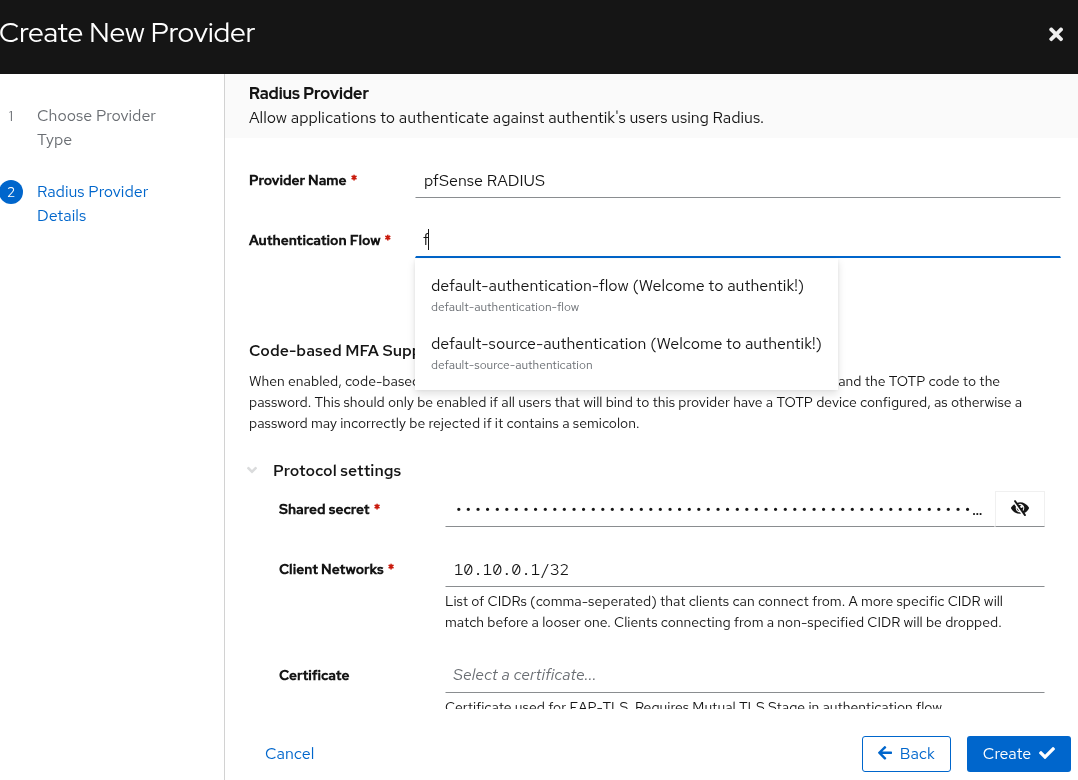
Three settings carry the design:
Authentication flow, not authorisation flow. RADIUS has no browser, so there’s no consent screen to show. Pointing it at default-authentication-flow — the same flow the web logins use — is what makes MFA carry across for free.
Client Networks is the access control: a CIDR list of who may even talk to the RADIUS server. Set to the firewall’s IP and nothing else, everything else is dropped before authentication is attempted.
Code-based MFA support, with a quirk worth knowing: RADIUS has no way to prompt for a second factor mid-conversation. So Authentik takes the TOTP code appended to the password, semicolon-separated — password;123456. Ugly, but it’s how you get MFA through a protocol that never imagined it.
Two constraints emerged from the docs:
- PAP only. Authentik can’t do MS-CHAPv2, because that requires reversibly-hashed passwords and Authentik (correctly) doesn’t store them that way.
- Authentication only, no accounting. Asking for accounting produces confusing failures.
The outpost turned out to deploy itself — Authentik has the Docker socket mounted, so creating the outpost in the UI spawned the container automatically. My hand-written compose service collided with it on UDP 1812 and errored. Fair enough; less work.
And then it didn’t work
pfSense’s built-in Diagnostics → Authentication test — which is the right way to do this, because it validates the backend without touching the login page — just hung, then failed.
5. Troubleshooting: proving it wasn’t me
This is the part worth reading.
Layer by layer
Is the port published?
ak-outpost-radius  0.0.0.0:1812->1812/udp
UNCONN  0  0  0.0.0.0:1812  users:(("docker-proxy",pid=81627))
Published, bound, listening. Not it.
Are packets arriving? Watch both ends at once — outpost logs in one terminal, the wire in another:
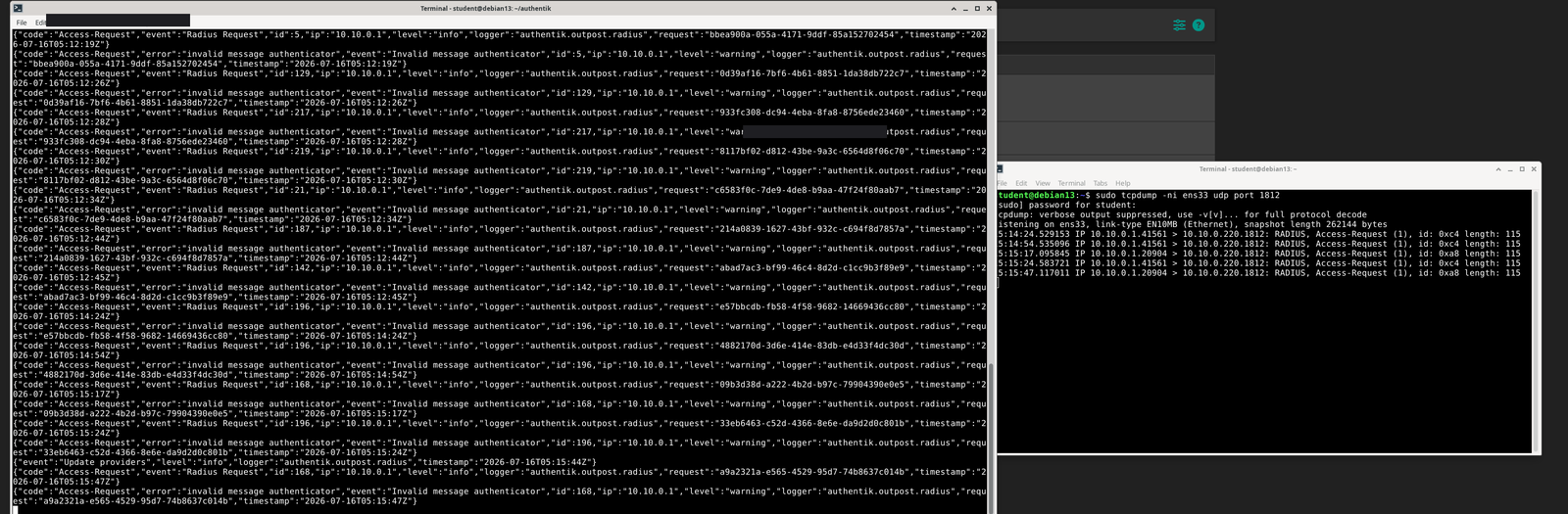
15:14:24 IP 10.10.0.1.41561 > 10.10.0.220.1812: RADIUS, Access-Request (1), length 115
{"code":"Access-Request","event":"Radius Request","ip":"10.10.0.1","level":"info"}
{"code":"Access-Request","error":"invalid message authenticator","level":"warning"}
So the request arrives, is parsed, and is rejected. Networking, Docker port publishing, the client-network ACL, the outpost process — all working. This is now purely an authentication decision.
The error that can only mean one thing
“Invalid message authenticator” is one of the more usefully specific errors in networking. The Message-Authenticator is an HMAC computed over the packet using the shared secret. If it doesn’t validate, the two ends disagree about what the secret is. It cannot mean anything else — not a bad password, not a bad TOTP code, not PAP. It fails before credentials are even looked at.
So: regenerate the secret. Authentik produces a 128-character one; suspecting truncation somewhere, I replaced it with 32 hex characters — alphanumeric only, nothing to escape, short enough that nothing could silently cut it. Copy-pasted to both ends.
Same error.
Knowing when to stop
At this point the right move isn’t to try harder. It’s to ask whether the thing is broken.
It was. An open issue on the project’s tracker, filed five weeks earlier, described the exact symptom: the RADIUS outpost rejecting every Access-Request with invalid message authenticator. The reporter had already ruled out everything I was about to try — fresh deployment, simplified alphanumeric secret, host network mode, deleting and recreating the provider and outpost. It reproduced across two unrelated clients neither of us shared: a FortiGate firewall and a standalone RADIUS test utility. They traced it to a hashing regression in the Go RADIUS library the outpost uses.
Status: open. No assignee, no linked PR, no workaround. Affects PAP, CHAP and MSCHAPv2. Same version series I was running.
The configuration was correct all along.
That’s the genuinely transferable lesson. Layered diagnosis — port published → packets arriving → request parsed → rejected at HMAC validation — didn’t just fail to find my mistake. It produced positive evidence that there wasn’t one. Without those logs and that tcpdump I’d have spent the evening regenerating secrets, because “it must be something I did” is the default assumption and it’s usually right.
Usually.
6. Pivot: LDAP
Here’s the part that stings slightly: Authentik’s own documentation integrates pfSense via LDAP, not RADIUS. RADIUS was my choice, driven by the plan I’d written. LDAP was the supported path the whole time, and it’s a completely separate outpost codebase — so it doesn’t carry the bug.
Sometimes the pivot is just reading the docs for the device rather than the protocol.
Deliberately insecure first
Plain LDAP on port 389 to start — cleartext on a LAN segment between two VMs. That’s no worse than the PAP I’d been about to use, and it means one variable at a time. Prove the chain, then add TLS. Adding certificates to something that doesn’t work yet just gives you two problems.
The step the docs skip
pfSense needs a service account to bind as and search with. Creating it is documented. What isn’t clearly documented is that the account needs an explicit Search full LDAP directory permission on the LDAP provider:

Without it, the bind succeeds — credentials are fine — and every search returns empty. So the firewall reports authentication failure for a user that plainly exists, and you go and re-check your DNs for an hour. A failure that looks like the wrong thing is worse than one that looks like nothing.
The pfSense side
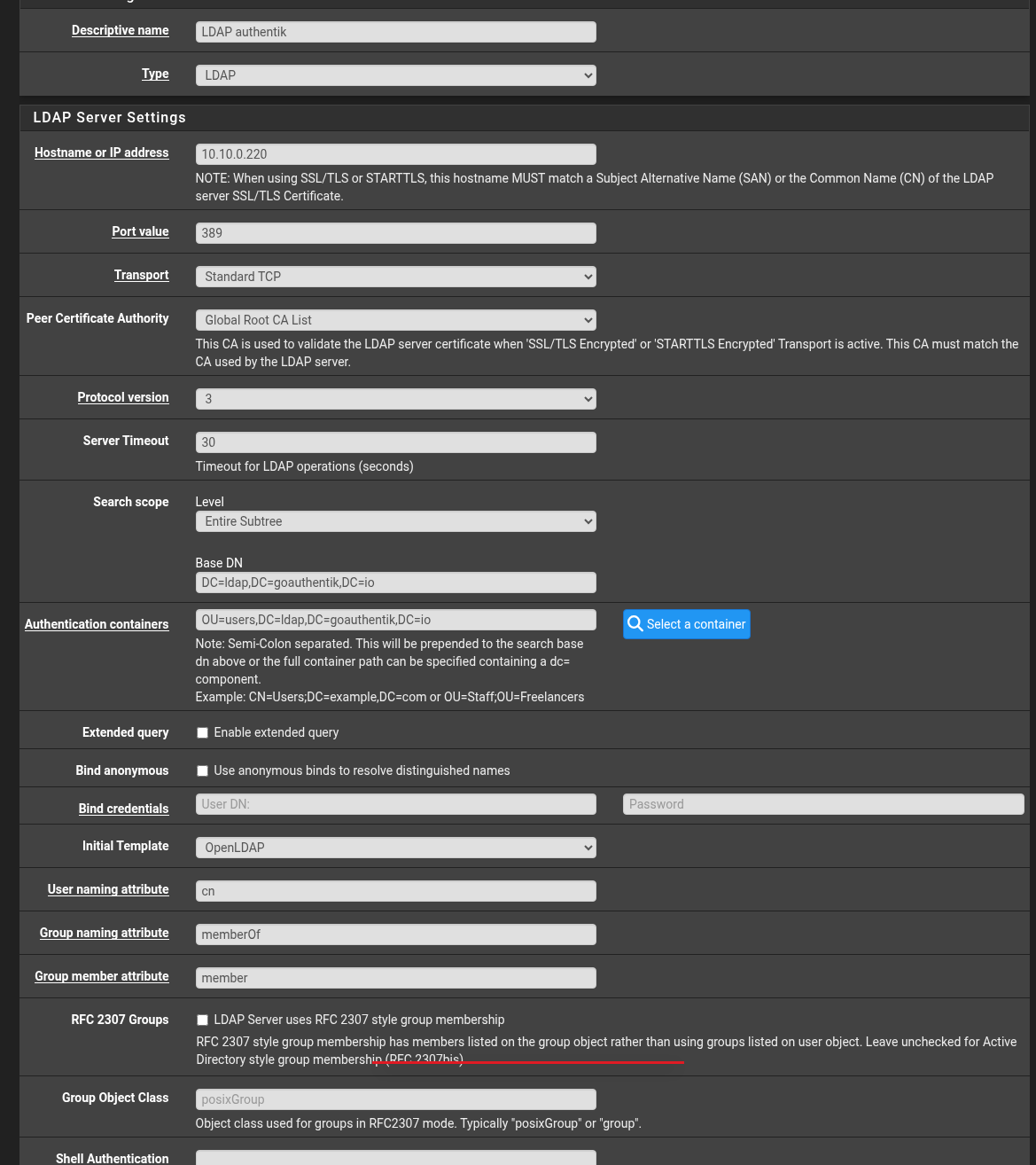
Two fields the template gets wrong for Authentik:
- Group naming attribute →
cn(what identifies a group object) - Group member attribute →
memberOf(the attribute on a user listing their groups)
pfSense’s OpenLDAP template defaults to member, which expects membership listed on the group object — RFC 2307 style. Authentik does it the Active Directory way: membership lives on the user as memberOf. Which is also why RFC 2307 Groups stays unchecked.
And Server Timeout 30, not the default 5 — the bind runs an entire Authentik flow including the MFA stage. Measured later in the logs: 971ms. Not a lookup, an evaluation.
7. Troubleshooting, round two: authenticated but anonymous
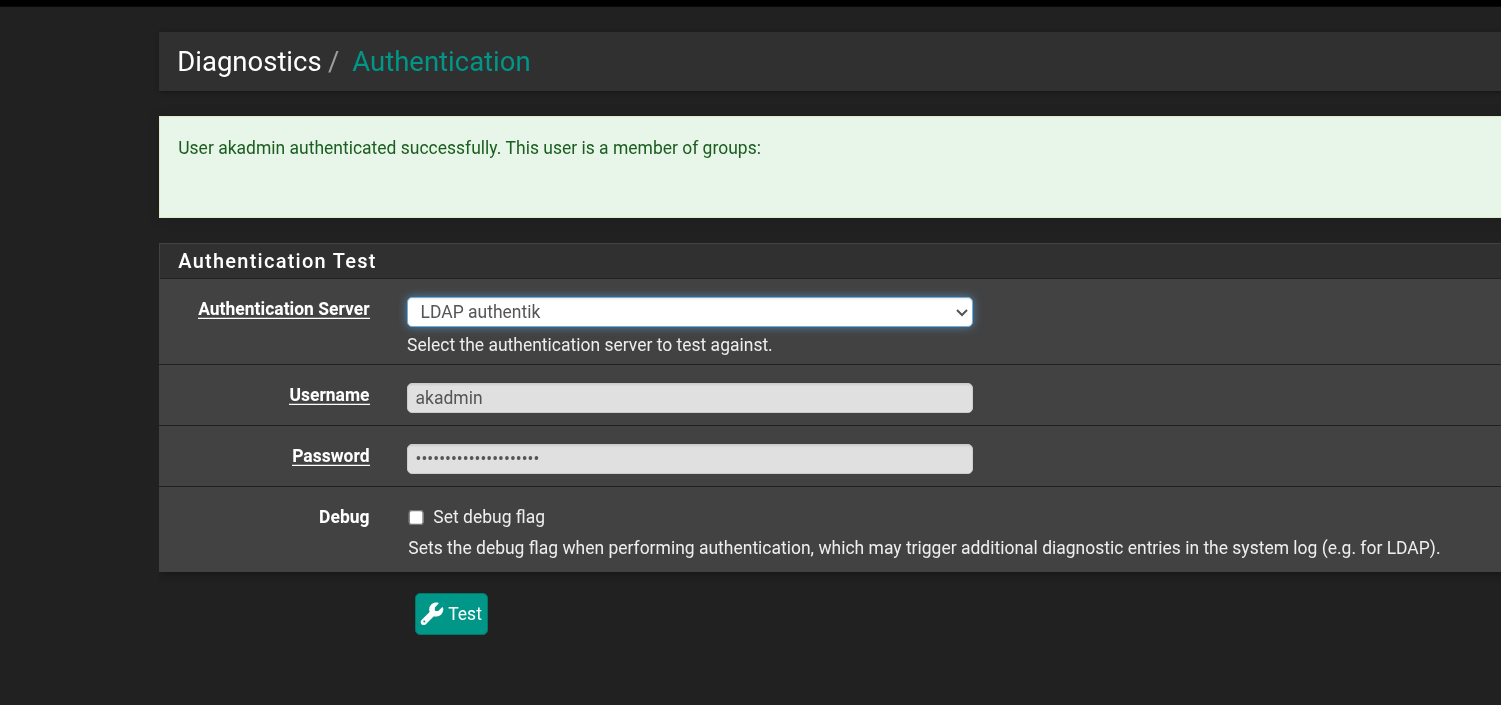
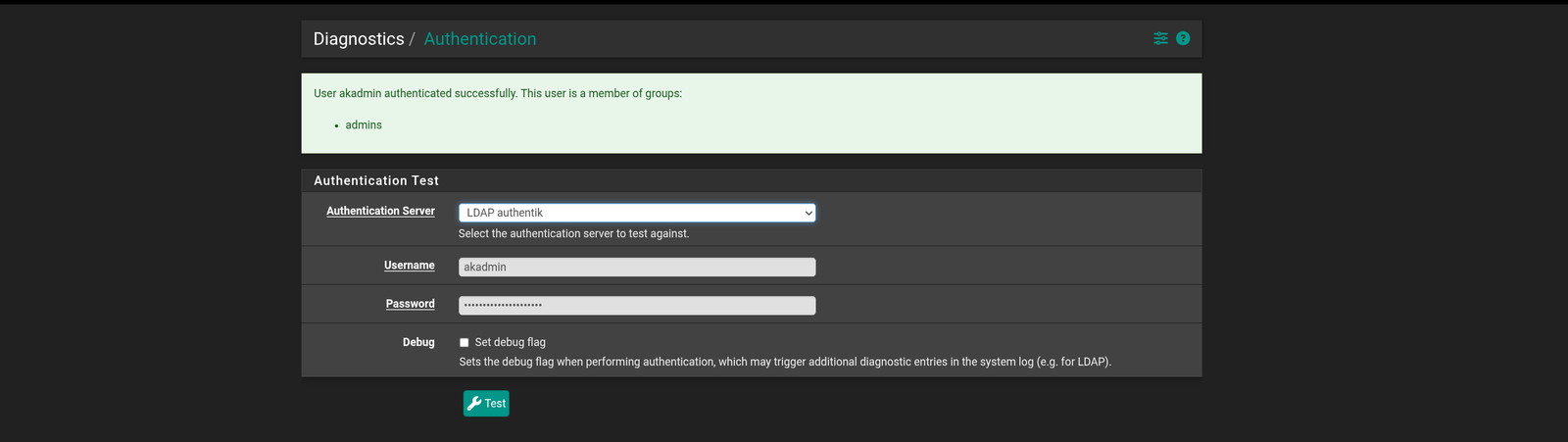
User akadmin authenticated successfully. This user is a member of groups:
And then nothing.
Authentication worked. Authorisation didn’t. Password and TOTP both validated through the semicolon syntax — the hard part was done. But no groups came back, and pfSense grants privileges by group. Flipping the login over at this point would have meant logging in successfully with zero privileges: a lockout with extra steps.
Asking the directory directly
Same instinct as the tcpdump. Stop guessing, query it:
ldapsearch -x -H ldap://10.10.0.220:389 \
  -D "cn=pfsense-user,ou=users,dc=ldap,dc=goauthentik,dc=io" \
  -W -b "dc=ldap,dc=goauthentik,dc=io" "(cn=akadmin)"
memberOf: cn=authentik Admins,ou=groups,dc=ldap,dc=goauthentik,dc=io
memberOf: cn=admins,ou=groups,dc=ldap,dc=goauthentik,dc=io
Both groups. Correctly formed. Published fine.
So why couldn’t pfSense see them?
The answer is in who asked
That search bound as the service account. And pfSense’s login flow doesn’t work that way:
- Bind as the service account → find the user
- Re-bind as that user to verify their password
- Search for their groups — on the connection now authenticated as them
Step 3 runs as akadmin, not as pfsense-user. And only pfsense-user had the search permission.
So: authentication succeeded (step 2 is a bind, no search needed), and the group search returned empty (step 3 had no permission). My ldapsearch worked precisely because I ran it as the account that could search.
The fix: the logging-in user needs the search permission too. Cleaner still, the LDAP provider’s Search group field: grant it to a group, and firewall access becomes a group membership rather than a per-user role assignment.
I found no documentation for this behaviour. It came out of reading the outpost logs and noticing which bindDN each search was running under.
An interlude in self-inflicted pain
Mid-debugging I reset the service account’s password and pasted it into the User DN field instead of the Password field. The logs were merciless:
{"bindDN":"‹redacted-password›","event":"No provider found for request","request":"bind"}
The firewall was trying to bind as a distinguished name called ‹redacted-password›. It matched no base DN, so Authentik couldn’t even route it to a provider — hence “no provider found” rather than “invalid credentials.” An error precise enough to be funny, and a reminder that the logs will tell you what you actually sent, which is frequently not what you think you sent.
(The password went into the logs in plaintext, because it landed in a field that gets logged. It was rotated immediately. Machine credentials should be openssl rand -base64 24 and never typed by a human — this is exactly why.)
8. The final trap
With the test fully green, the login page still rejected the account — while the local admin account worked fine.
Two red herrings in one:
admin working proves nothing. pfSense special-cases its built-in admin account to always authenticate locally, as a deliberate lockout guard. It would work no matter how broken the LDAP config was.
A passing Diagnostics test proves less than you think. That page lets you choose which server to test — it doesn’t consult the login page’s configuration at all.
The actual cause: System → User Manager → Settings still said Local Database. The Authentication Servers tab lists available backends; the Settings tab picks which one the login page uses. I’d been admiring a correctly-populated list on the wrong tab. The login page never asked Authentik — the account simply didn’t exist locally, hence “Username or Password incorrect.”
There’s a nice symmetry in that: the RADIUS failure was a genuine upstream bug that looked like my mistake, and this one was entirely my mistake that looked like a bug.
One more cosmetic scare: pfSense’s Save & Test reports Attempting to fetch Organizational Units ... failed, with connection and bind both OK. That’s expected — Authentik’s LDAP outpost presents a virtual directory with no browsable OU objects. pfSense only uses that step to populate a “select a container” helper. Harmless.
9. It works
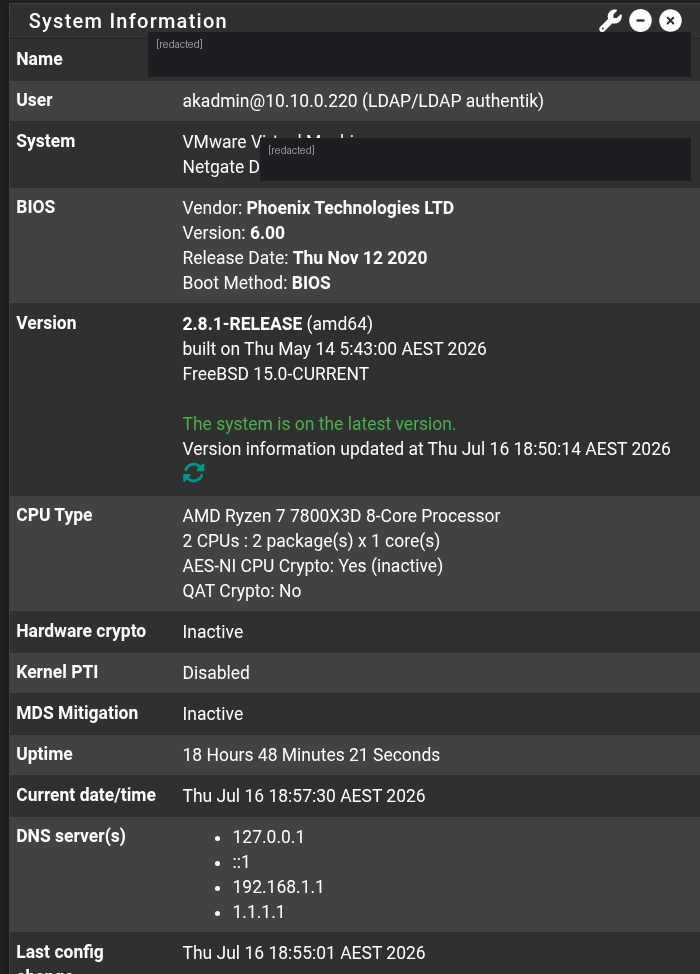
User: [email protected] (LDAP/LDAP authentik)
Full admin menu, granted by group membership. The login required a password and a TOTP code, enforced by an identity provider the firewall knows nothing about beyond an IP address and a base DN.
The firewall has no MFA support. It never will. It doesn’t need any.
10. The break-glass question
The natural next thought: disable the local admin account, so only the IdP account works.
Don’t. Look at the dependency chain a login now traverses:
Debian host up → Docker running → Postgres + Redis → Authentik server → LDAP outpost → network path to the outpost
Six things. And a specific nightmare: suppose a firewall rule change accidentally blocks the LDAP host. Now you need the firewall’s GUI to fix it — but logging in requires reaching a host through the firewall you just broke. On a VM, that’s a console away. In a rack, that’s a drive.
This is a named pattern, and keeping the local account is explicitly best practice, not a compromise. It’s a break-glass account — Microsoft recommends organisations maintain two cloud-only emergency access accounts in Entra ID, deliberately excluded from MFA and conditional access, precisely so an identity provider outage can’t lock everyone out of their own tenant.
So the answer isn’t “remove local auth.” It’s:
- One local account, long random password, stored offline as well as in the vault — because the vault may live on the machine that’s down
- Never used routinely — the IdP account is the daily driver
- Alerted on — a local-admin login should page you, because it means something broke or someone’s somewhere they shouldn’t be
You can’t remove the account. You can make sure it’s never used silently.
11. Skills demonstrated
- Identity protocols across device classes — OIDC for web apps, RADIUS and LDAP for network gear, and why the protocol is a property of the client rather than the identity
- RADIUS mechanics — shared secrets, the Message-Authenticator HMAC, PAP vs MS-CHAPv2 and why reversible hashing decides it, client network ACLs
- LDAP mechanics — DNs, bind vs search,
memberOfvsmember, RFC 2307 vs AD-style membership, and multi-step bind flows - Layered diagnosis — port → packet → parse → decision, and reading counters and logs rather than re-checking config
- Knowing when the bug isn’t yours — and how to produce evidence rather than a feeling
- Break-glass design — deliberate emergency access, and why “lock it all down” is the wrong instinct
The through-line: most of this build was diagnosis, not configuration. The config is twenty fields. The value was in the tools that told the truth — tcpdump proving packets arrived, outpost logs naming the rejection, ldapsearch showing that the directory published exactly what the client claimed not to see, and a bindDN field quietly revealing a password in the wrong box.
When every layer insists it’s fine and the thing still doesn’t work, stop asking the config and start asking the wire.
Next: an always-on host, so the identity provider stops being a service that sleeps at night — and the firewall stops depending on a VM that boots slower than it does.