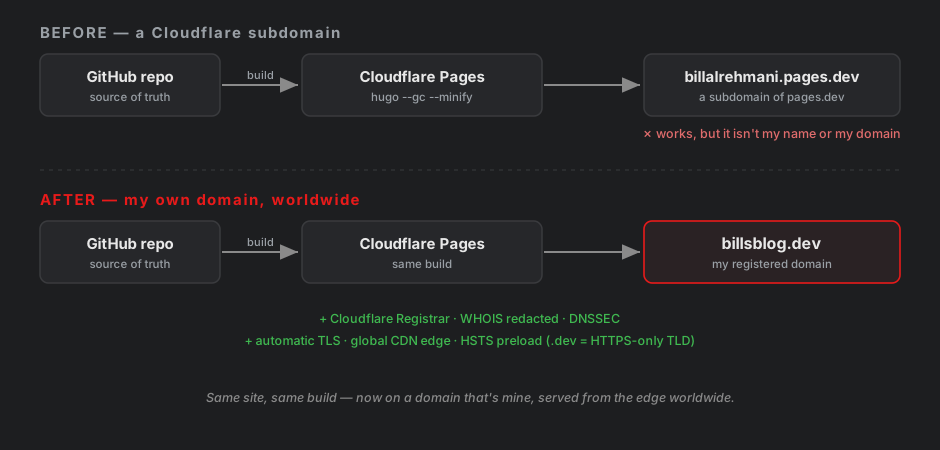
The blog you’re reading just moved house. Same content, same build, the same Cloudflare Pages underneath — but the address on the door changed from billalrehmani.pages.dev to a domain that’s actually mine: billsblog.dev.
Why bother — it already worked
billalrehmani.pages.dev was fine. It served over HTTPS, it was fast, it was free. But pages.dev is Cloudflare’s namespace, not mine. For a portfolio I link from LinkedIn and want people to remember, “billalrehmani-dot-pages-dot-dev” is a mouthful and a borrowed address. Owning the domain means owning the identity — and, as it turned out, a bit more control over the security posture too.
Why .dev
I picked .dev on purpose. It’s Google-run and aimed at developers, but the part that sold me is a security detail: the entire .dev TLD is on the HSTS preload list. Browsers refuse to talk to any .dev site over plain HTTP — HTTPS is enforced before the first request even leaves the machine. For a blog that spends half its posts on hardening things, a TLD that’s HTTPS-only by construction felt right.
I also dropped the hyphen. bills-blog.dev was available, but hyphens get forgotten and mistyped — people type billsblog.dev and land nowhere. So billsblog.dev it is.
Registering it (with one hiccup)
I registered through Cloudflare Registrar for two reasons: it sells domains at cost — no markup, and none of the “cheap first year, painful renewal” trick — and it turns on WHOIS redaction by default, so my name, address, and email don’t end up in a public lookup. Since the site was already on Cloudflare, DNS and DNSSEC live in the same dashboard.
It wasn’t totally clean. Mid-registration I hit:
Unable to verify trademark claims for this domain. Please try again later.
If the issue persists, please contact support.
That’s the Trademark Clearinghouse check — before finalizing a domain, the registrar has to look up whether the name matches a registered trademark and, if it does, show a claims notice. “billsblog” obviously isn’t trademarked, so this was just the lookup timing out on Cloudflare’s side. I waited a minute, retried, and it went through. Nothing was charged on the failed attempt.
Pointing it at the site
Because the domain was already on Cloudflare, attaching it to the existing Pages project was almost nothing:
- Pages project → Custom domains → Set up a domain →
billsblog.dev. - Accept the auto-created DNS record.
- Wait a couple of minutes for the status to go Active while Cloudflare provisions the TLS certificate.
Both addresses still resolve — billalrehmani.pages.dev sticks around as the build subdomain — but billsblog.dev is the one that matters now.
The one line in the repo that changed
On the Hugo side, the entire migration was a single value:
baseURL = "https://billsblog.dev/"
That’s it. baseURL is what Hugo stamps onto every absolute URL, so changing it cascades automatically to the canonical tags, the RSS feed, the sitemap, and the Open Graph image URLs. A quick check after the rebuild:
$ curl -s https://billsblog.dev/ | grep -o 'rel=canonical href=[^ >]*'
rel=canonical href=https://billsblog.dev/

$ curl -s https://billsblog.dev/sitemap.xml | grep -c billsblog.dev
69
Canonical points home, and all 69 sitemap entries carry the new domain — so search engines treat billsblog.dev as the real thing and won’t ding me for duplicate content on the old subdomain.
What came along for free
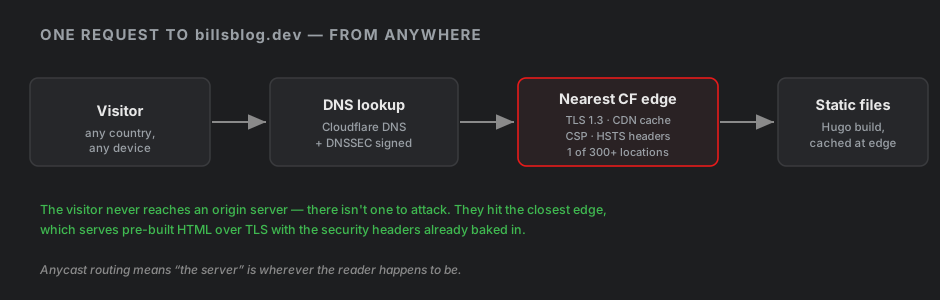
The part I was braced for — re-doing the security work on the new origin — turned out to be nothing. It all carried over untouched:
- The CSP. Every directive uses
'self', which is relative to whatever origin is serving the page. Move the site to a new domain and'self'just means the new domain. The hash-lockedscript-src, the whole header set — all of it applied tobillsblog.devwith zero edits. - Analytics. GoatCounter is keyed to my account, not the hostname, so it started counting the new domain immediately.
- Comments. giscus maps discussions by page path, which didn’t change.
Nothing about the site’s content-level security is different on a custom domain. Same files, same build, same edge.
What a domain actually changes for security
Honestly? Less than you’d think — with two exceptions worth naming.
It adds one attack surface: the domain itself. With a pages.dev subdomain, Cloudflare owns the parent domain and its DNS; I couldn’t lose it to a registrar problem if I tried. With my own domain, a hijack — registrar account compromise, an expired registration, DNS spoofing — could point my name at someone else’s server. Low odds, real surface. The mitigations are the boring, effective ones: registrar lock, 2FA on the account, auto-renew so it never lapses, and DNSSEC (one toggle on Cloudflare) so responses can’t be forged.
It adds one privacy consideration: WHOIS. Registering a domain normally publishes your contact details. Cloudflare redacts them by default, which is the whole reason I didn’t have to think about it — but it’s exactly the kind of thing that leaks if you register somewhere careless.
The flip side is that owning the whole domain gives me controls the shared subdomain never could: DNSSEC, CAA records, and a real HSTS policy. So I finished by tightening that header:
Strict-Transport-Security: max-age=31536000; includeSubDomains; preload
includeSubDomains commits every future *.billsblog.dev to HTTPS-only, and preload marks the header as eligible for the browser preload list. I did not submit it to hstspreload.org, though — .dev is already preloaded at the TLD level, so the whole domain is HTTPS-forced regardless, and an individual submission would be both redundant and far harder to walk back than the free protection I already get.
Where it landed
Same blog, same honest little build pipeline. It just has its own name now — billsblog.dev — served over TLS from whichever Cloudflare edge is closest to whoever’s reading, with the security headers baked in. The old subdomain still works; it’s just not the front door anymore.