I ended up with two VPNs into my homelab. WireGuard, running on my firewall, which I set up first. And Tailscale on my main server, which I added later so I could SSH in from a laptop without opening ports.
Then I tried to use both from my phone and hit a wall.
Phones only run one VPN at a time
This isn’t a bug or a conflict between the two apps. iOS and Android both allow exactly one active VPN tunnel, full stop. It’s an OS-level restriction.
So I could have WireGuard or Tailscale connected, never both. Flipping between them depending on what I wanted to reach is exactly the kind of small friction that means you eventually stop using the thing.
I wanted one VPN that reached everything.
The thing that made this easy: Tailscale is WireGuard
This surprised me when I first learned it, and it reframes the whole problem.
Tailscale doesn’t compete with WireGuard — it’s built on WireGuard. Same protocol, same encryption. What Tailscale adds is everything around it: distributing keys between your devices, punching through NAT so you don’t need port forwarding, and a web console for managing it.
That distinction is worth holding onto: WireGuard is the tunnel, Tailscale is the management layer on top.
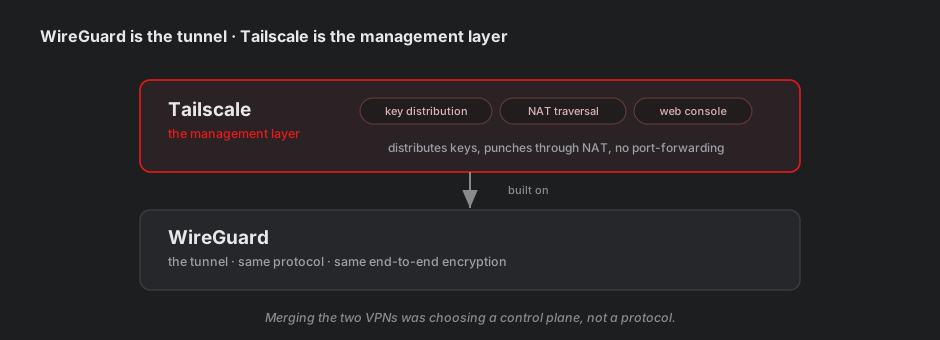
Which means “merging my two VPNs” was never about bridging two technologies. It was about picking which management layer runs the show.
Why Tailscale only reached one machine
Here’s the gap I needed to close.
My WireGuard tunnel terminated on my firewall, which is the router for my whole lab network. Connect to it and you can reach everything behind it — every server, every service.
Tailscale was installed on my main server, which is just one machine on that network. Connect and you reach… that one machine. Nothing else.
The fix is a feature called a subnet router. You tell one Tailscale machine: “advertise this whole range of addresses — send traffic for any of them to me, and I’ll forward it on.”
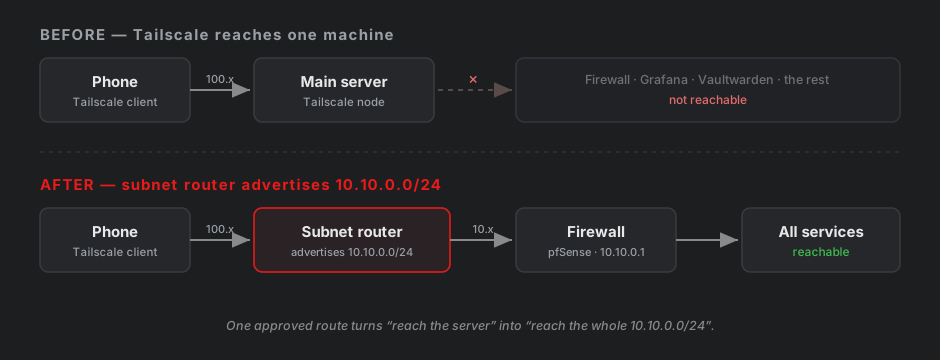
Three parts to it:
Tell Tailscale which range to advertise.
sudo tailscale set --advertise-routes=10.10.0.0/24
Note tailscale set, not tailscale up. Both work, but up re-runs the whole login process and can quietly reset settings you didn’t mention in the command. set changes one thing and leaves everything else alone. I’d rather not discover I’d wiped my SSH config by accident.
Let the machine forward packets.
Linux normally drops any packet that isn’t addressed to it. A subnet router’s entire job is forwarding packets addressed to other machines, so this has to be switched on:
echo 'net.ipv4.ip_forward = 1' | sudo tee /etc/sysctl.d/99-tailscale.conf
sudo sysctl -p /etc/sysctl.d/99-tailscale.conf
Writing it into /etc/sysctl.d/ rather than setting it live means it survives a reboot. My lab VMs shut down every night, so anything that doesn’t survive a reboot may as well not exist.
Approve it in the console.
This one caught me. Advertising a route does nothing on its own — the route sits there inert until you approve it in the Tailscale admin console.
That’s deliberate, and it’s good design. If it worked automatically, any compromised machine in your network could announce “send me all traffic for this range” and quietly become a man in the middle. Approval means a human has to agree.
Then nothing worked, three times
100.x versus 10.x
I set up a terminal app on my phone so I could SSH in without a browser. It connected to nothing.
Every Tailscale device gets a 100.x.y.z address — that’s its identity on your private network, and it works between any two Tailscale devices, always.
My lab machines also have 10.10.0.x addresses — ordinary local network addresses, only reachable through the subnet route.
I was typing the 10.x one. And it turns out apps with Tailscale built into them often don’t accept subnet routes by default, so the 10.x address went nowhere for that app even though it worked fine in Safari.
Connecting to the 100.x address worked immediately.
Rule of thumb: the 100.x address is the reliable one. It doesn’t depend on route approval, or on a particular app’s settings.
Linux ignores subnet routes on purpose
Same symptom on my laptop — everything worked from the phone, nothing worked from the laptop.
Linux Tailscale clients don’t accept subnet routes unless you explicitly turn it on. macOS, Windows and iOS accept them by default; Linux doesn’t, because a subnet route can override how the machine reaches its own local network — potentially breaking things in confusing ways.
sudo tailscale set --accept-routes
Sensible default once you know the reasoning. Baffling until then.
The DNS one
Routing now worked — I could reach my firewall by IP address. But my actual services, the ones I reach by name, still didn’t load.
Testing by IP is what separated the two problems. Hitting my reverse proxy’s IP directly returned its “no such service” error page. That’s a success: it means I reached the proxy, and it only refused because I’d come by IP instead of hostname. Routing was fine. Names were the problem.
My lab services live on real subdomains with real certificates, and those names resolve to a private address. Most public DNS servers refuse to return private addresses for public domain names — it’s a protection against an attack called DNS rebinding, where a malicious site tricks your browser into talking to devices inside your network.
With WireGuard, my phone had been using my firewall as its DNS server, and I’d configured an exception there. Tailscale devices use ordinary public DNS, so the exception didn’t apply.
The fix is split DNS — in the Tailscale console, add a custom nameserver pointing at my firewall, restricted to just my lab domain.
That restriction matters. Send all DNS to my firewall and my phone would lose the ability to resolve anything at all whenever the lab is powered off — which is every night.
Hardening: the part that actually mattered
Getting it working took an evening. Deciding what it should be allowed to do was the more interesting half.
The uncomfortable realisation
By default, every device in a Tailscale network can reach every other device on every port. Combine that with a subnet router advertising your whole lab, and every device you own has unrestricted access to everything.
That’s worse than it sounds in my case. I run a metrics database with no authentication at all — it was fine when it only listened on the local machine. Now my phone could read every metric about my network from anywhere in the world.
Worth pausing on: the subnet router routed around my own segmentation. I’d spent weeks building firewall rules and VLAN isolation, and then punched a tunnel that lands behind all of it.
Access rules
Tailscale lets you write a policy controlling who reaches what. Mine now says: my devices can reach the lab network, but only on SSH, web, and DNS ports.
"grants": [
  {
    "src": ["autogroup:member"],
    "dst": ["10.10.0.0/24"],
    "ip":  ["tcp:22", "tcp:80", "tcp:443", "udp:53", "tcp:53"],
  },
  {
    "src": ["autogroup:member"],
    "dst": ["autogroup:self"],
    "ip":  ["*"],
  },
]
First rule: reach the lab, but only on those ports. My unauthenticated metrics database is now unreachable — along with anything else I deploy later and forget to think about. That’s default-deny, and it’s the whole value: it protects you from your own future carelessness, not just today’s known gaps.
Second rule: my own devices can still reach each other on any port, so SSH between them keeps working.
The DNS port is in there deliberately. Leave it out and the split DNS I’d just fixed would break again.
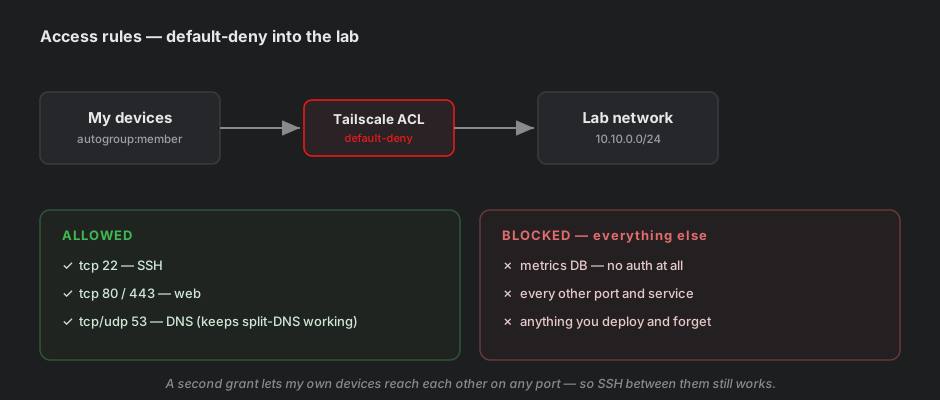
Testing it was satisfying: my firewall’s admin page still loaded, and my metrics database timed out. The failure was the feature.
One thing worth knowing: this policy lives in the web console, not on any of my machines. It’s enforced centrally when Tailscale distributes keys and routes. Which also means a mistake in it can never lock you out of the console itself — always recoverable.
The trust question
Here’s what I find genuinely interesting about all this.
Tailscale works by having a central service distribute your devices’ encryption keys to each other. That service is run by Tailscale. Your traffic is end-to-end encrypted and never passes through them — but they decide which keys your devices trust.
In principle, a compromised Tailscale could add a device to your network and your machines would accept it, because they trust whatever the coordination service tells them.
There’s a feature that removes this — Tailnet Lock. Once enabled, new devices must be cryptographically signed by a machine you control before your other machines will trust them. Tailscale’s servers could be fully compromised and still couldn’t add anything to your network.
I couldn’t enable it, for two separate reasons, and both are worth writing down.
It’s not available to every account. It has to be requested for your network, and may not be offered on free plans at all. My attempt returned a flat access-denied.
It conflicts with device approval. This is the interesting one. Device approval — where a new device authenticates but then waits for you to manually approve it — gates the same decision. Tailscale won’t let you run both, because both are answering “may this device join?”
So it’s a genuine choice:
| Protects against | Requires | |
|---|---|---|
| Device approval | Someone with your stolen password adding a device | A click in the console |
| Tailnet Lock | Tailscale’s own infrastructure being compromised | A machine you control, online, with a command line |
Tailnet Lock is the stronger guarantee. I kept device approval anyway, for reasons specific to my setup:
- Both machines that could sign are on hardware that sleeps — my server shuts down nightly, my laptop is usually off. Adding a device would mean waking something first.
- My phone can’t sign at all — signing needs a command line, which phones don’t offer.
- A phished password is a realistic threat for a personal account. Tailscale being compromised is a real risk but a much rarer one.
And I still have my WireGuard tunnel, which doesn’t depend on Tailscale at all — so if that trust ever broke, I have another way in.
What I kept, and why
I didn’t delete the WireGuard tunnel. Tailscale is now my daily driver, but the WireGuard config stays on my firewall as a break-glass path.
The reasoning is the same as keeping a local admin account on a device that uses single sign-on: your emergency access shouldn’t depend on the same thing as your normal access. Tailscale depends on a company’s servers I don’t control. WireGuard doesn’t depend on anything but my own firewall and a port on my router.
Two independent ways in, for something I rely on being able to reach remotely.
Takeaways
- Phones run one VPN at a time. If you have two, you’ll end up using one.
- Tailscale is WireGuard with a management layer. Choosing between them is choosing a control plane, not a protocol.
- A subnet router is what turns “reach one machine” into “reach the network.” But it also routes around your own segmentation — worth being deliberate about.
- The
100.xaddress is the reliable one. Local addresses depend on routes being approved and accepted. - Linux doesn’t accept subnet routes by default. macOS, Windows and iOS do.
- Test by IP before blaming the network. If the IP works and the name doesn’t, it’s DNS — every time.
- Default-allow is the real default. Every device reaching everything is where you start, and the access rules are what earn the security.
- Security features can be mutually exclusive. Knowing why you picked one is more valuable than having picked the stronger-sounding one.
The setup was an evening. The interesting part was every point where something didn’t work and the reason turned out to be a deliberate design decision by someone who’d thought about it harder than I had.
Next: putting a login in front of that metrics database, so the access rules aren’t the only thing standing between it and the world.